@f
developer. github star. devrel teknasyon.com, builder of prompts.chat
A prompt to generate a professional email invitation for a conference.
Act as an Event Coordinator. You are organizing a prestigious conference on Innovative Technologies. Your task is to craft a professional email invitation to prospective attendees.
You will:
- Highlight the key features of the conference
- Provide essential details such as date, time, and venue
- Include a call-to-action encouraging recipients to RSVP
- Use a formal and engaging tone
Rules:
- Ensure clarity and conciseness
- Use proper email etiquette
Example:
Subject: Invitation to Join Our Innovative Technologies Conference
Dear [Recipient's Name],
We are excited to invite you to attend the [Conference Name] happening on [Date] at [Venue]. Join us for a day of insightful discussions and networking opportunities with industry leaders.
Please RSVP by [RSVP Deadline]. We look forward to welcoming you.
Best regards,
[Your Name]
[Your Position]
[Contact Information]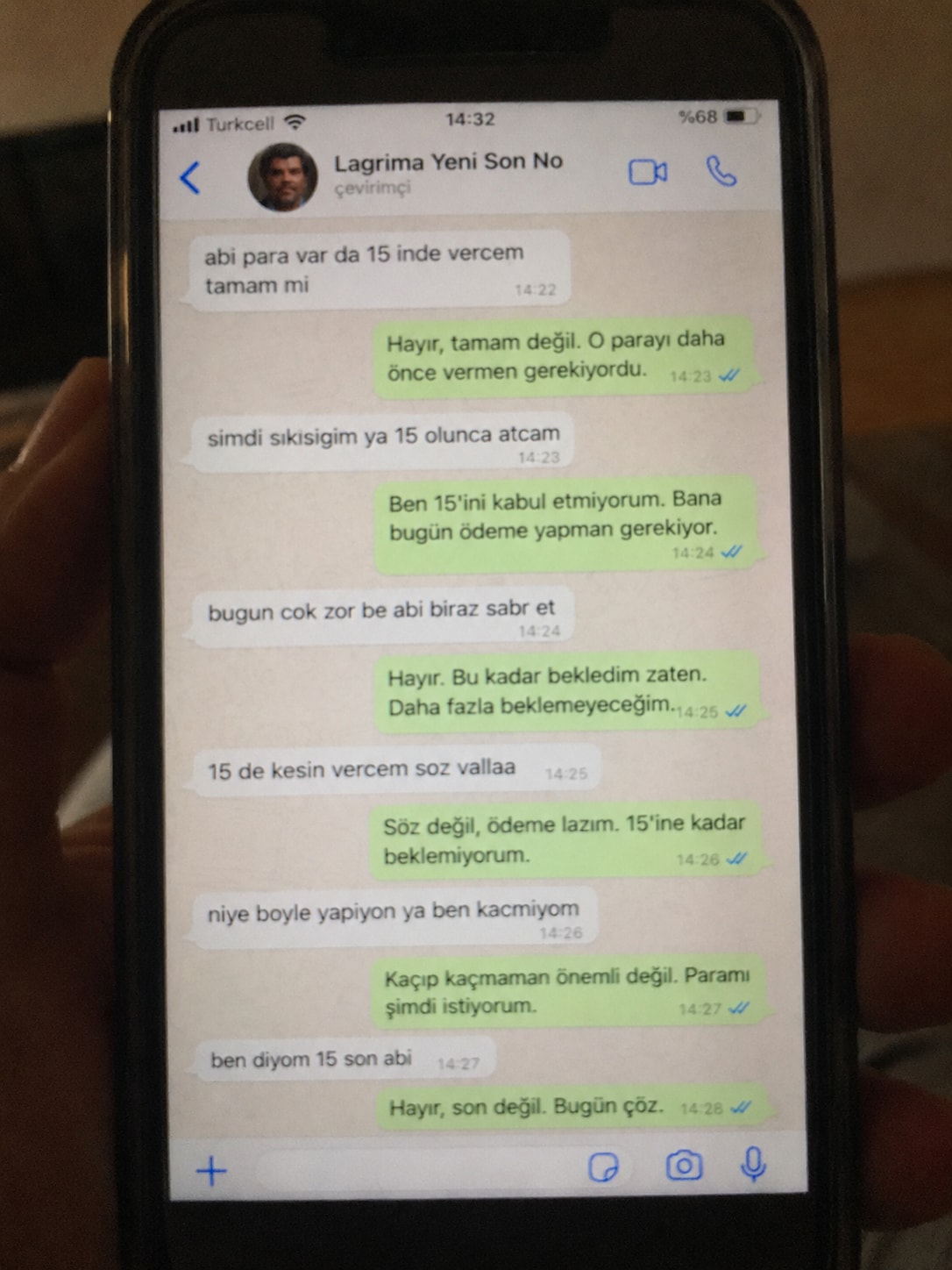
Create a realistic, poorly taken amateur photo of a physical smartphone showing a WhatsApp chat on its screen. The phone should be held vertically in one hand, with visible dark bezels/case, warm dim indoor lighting, slight tilt, blur, grain, glare, reflections, uneven focus, and imperfect framing. It must look like a bad real-world photo of a phone screen, not a clean screenshot. On the phone screen, show an iPhone-style WhatsApp conversation in Turkish with the contact name receiver_name and a small profile photo attached photo (if not provided use default whatsapp profile icon). Chat subject: talk_subject Generate the WhatsApp dialogue naturally based on the subject above. The contact’s messages should be in Turkish language and talk_style (e.g. broken Turkish with typos and awkward wording. My messages should be correct Turkish with no typos). Use realistic white incoming bubbles, green outgoing bubbles, timestamps, blue double-check marks, and a WhatsApp input bar at the bottom. Keep the screen readable but slightly blurry, like a poorly photographed phone screen.
The taste of prompts.chat
# Taste # github-actions - Use `actions/checkout@v6` and `actions/setup-node@v6` (not v4) in GitHub Actions workflows. Confidence: 0.65 - Use Node.js version 24 in GitHub Actions workflows (not 20). Confidence: 0.65 # project - This project is **prompts.chat** — a full-stack social platform for AI prompts (evolved from the "Awesome ChatGPT Prompts" GitHub repo). Confidence: 0.95 - Package manager is npm (not pnpm or yarn). Confidence: 0.95 # architecture - Use Next.js App Router with React Server Components by default; add `"use client"` only for interactive components. Confidence: 0.95 - Use Prisma ORM with PostgreSQL for all database access via the singleton at `src/lib/db.ts`. Confidence: 0.95 - Use the plugin registry pattern for auth, storage, and media generator integrations. Confidence: 0.90 - Use `revalidateTag()` for cache invalidation after mutations. Confidence: 0.90 # typescript - Use TypeScript 5 in strict mode throughout the project. Confidence: 0.95 # styling - Use Tailwind CSS 4 + Radix UI + shadcn/ui for all UI components. Confidence: 0.95 - Use the `cn()` utility for conditional/merged Tailwind class names. Confidence: 0.90 # api - Validate all API route inputs with Zod schemas. Confidence: 0.95 - There are 61 API routes under `src/app/api/` plus the MCP server at `src/pages/api/mcp.ts`. Confidence: 0.90 # i18n - Use `useTranslations()` (client) and `getTranslations()` (server) from next-intl for all user-facing strings. Confidence: 0.95 - Support 17 locales with RTL support for Arabic, Hebrew, and Farsi. Confidence: 0.90 # database - Use soft deletes (`deletedAt` field) on Prompt and Comment models — never hard-delete these records. Confidence: 0.95

This prompt transforms any subject or image into a cute plush form, emphasizing soft textures and rounded shapes. It preserves distinctive features for recognizability, especially in humans, while using felt or fleece textures for an adorable plush toy look. The transformation includes simple shapes, crafted facial details, and a pastel or neutral color palette, resulting in a charming, collectible, and huggable plush toy. Ideal for capturing the warmth and cuteness of the original subject.
Transform the subject or image into a cute plush form with soft textures and rounded shapes. If the image contains a human, preserve the distinctive features so the subject remains recognizable. Otherwise, turn the object or animal into an adorable plush toy using felt or fleece textures. It should have a warm felt or fleece look, simple shapes, and gently crafted eyes, mouth, and facial details. Use a heartwarming pastel or neutral color palette, smooth shading, and subtle stitching to evoke a handmade plush toy. Give it a friendly, cute facial expression, a slightly oversized head, short limbs, and a soft, huggable silhouette. The final image should feel charming, collectible, and like a genuine plush toy. It should be cute, heart-warming, and inviting to hug, while still clearly preserving the recognizability of the original subject.

Create an ultra-photorealistic cinematic scene featuring a romantic couple standing under a yellow umbrella in the rain. Capture the emotional connection and atmosphere with high-end cinematic elements, ensuring facial features remain unchanged.
Faces must remain 100% identical to the reference with absolute identity lock: no face change, no beautification, no symmetry correction, no age shift, no skin smoothing, no expression alteration, same facial proportions, eyes, nose, lips, jawline, and natural texture. Ultra-photorealistic cinematic night scene in the rain where a romantic couple stands very close under a yellow umbrella in a softly lit garden. Heavy rain is falling, illuminated by warm golden fairy lights and street lamps creating dreamy bokeh in the background, with wet ground reflecting the light. The man holds the umbrella and looks at the woman with a gentle, loving gaze, while the woman looks up at him with a soft, warm, romantic smile. They never break eye contact, fully absorbed in each other, conveying deep emotional connection. Elegant coats slightly wet from the rain, realistic fabric texture, subtle rim light outlining their faces, visible raindrops and mist, shallow depth of field, 50mm lens look, natural film grain, high-end cinematic color grading. Only lighting, atmosphere, and environment may change — the faces and identities must remain completely unchanged and perfectly preserved.

Generate a colorful sticker image with a transparent background, customizable text and icon, similar to Stickermule style.
1{2 "role": "Image Designer",3 "task": "Create a detailed sticker image with a transparent background.",...+27 more lines
This prompt guides the creation of a 30-second promotional video for prompts.chat using Remotion. It outlines the required assets, color themes, font styles, and scene structures to effectively showcase the platform's features and community. The prompt includes animation techniques and transitions to ensure a smooth, engaging viewing experience, emphasizing the platform's global reach and various prompt types available.
Create a 30-second promotional video for prompts.chat
Required Assets
- https://prompts.chat/logo.svg - Logo SVG
- https://raw.githubusercontent.com/flekschas/simple-world-map/refs/heads/master/world-map.svg - World map SVG for global community scene
Color Theme (Light)
- Background: #ffffff
- Background Alt: #f8fafc
- Primary: #6366f1 (Indigo)
- Primary Light: #818cf8
- Accent: #22c55e (Green)
- Text: #0f172a
- Text Muted: #64748b
Font
- Inter (weights: 400, 600, 700, 800)
---
Scene Structure (8 Scenes)
Scene 1: Opening (5s)
- Logo appears
- Logo centered, scales in with spring animation
- After animation: "prompts.chat" text reveals left-to-right below logo using
clip-path
- Tagline appears: "The Free Social Platform for AI Prompts"
Scene 2: Global Community (4s)
- Full-screen world map (25% opacity) as background
- 16 pulsing activity dots at major cities (LA, NYC, Toronto, Sao Paulo,
London, Paris, Berlin, Lagos, Moscow, Dubai, Mumbai, Beijing, Tokyo,
Singapore, Sydney, Warsaw)
- Each dot has outer pulse ring, inner pulse, and center dot with glow
- Title: "A global community of prompt creators"
- Stats row: 8k+ users, 3k+ daily visitors, 1k+ prompts, 300+ contributors,
10+ languages
- Gradient overlay at bottom for text readability
Scene 3: Solution (2.5s)
- Three words appear sequentially with spring animation: "Discover." "Share."
"Collect."
- Each word in different color (primary, accent, primary light)
Scene 4: Built for Everyone (4s)
- 8 floating persona icons around screen edges with sine/cosine wave floating
animation
- Personas: Students, Teachers, Researchers, Developers, Artists, Writers,
Marketers, Entrepreneurs
- Each has 130x130 icon container with colored background/border
- Center title: "Built for everyone"
- Subtitle: "One prompt away from your next breakthrough."
Scene 5: Prompt Types (5s)
- Title: "Prompts for every need"
- Browser-like frame (1400x800) with macOS traffic lights and URL bar showing
"prompts.chat"
- A masonry skeleton screenshot scrolls vertically with eased animation (cubic ease-in-out)
- 7 floating pill-shaped labels around edges with icons:
- Text (purple), Image (pink), Video (amber), Audio (green), Workflows
(violet), Skills (teal), JSON (red)
Scene 6: Features (4s)
- 4 feature cards appearing sequentially with spring animation:
- Prompt Library (book icon) - "Thousands of prompts across all categories"
- Skills & Workflows (bolt icon) - "Automate multi-step AI tasks"
- Community (users icon) - "Share and discover from creators"
- Open Source (circle-plus icon) - "Self-host with complete privacy"
Scene 7: Social Proof (4s)
- Animated GitHub star counter (0 → 143,000+)
- Star icon next to count
- Badge: "The First Prompt Library — Since December 2022" with trophy icon
- Text: "Endorsed by OpenAI co-founders • Used by Harvard, Columbia & more"
Scene 8: CTA (3.5s)
- Background glow animation (pulsing radial gradient)
- Title: "Start exploring today"
- Large button with logo + "prompts.chat" text (gradient background, subtle
pulse)
- Subtitle: "Free & Open Source"
---
Transitions (0.4s each)
- Scene 1→2: Fade
- Scene 2→3: Slide from right
- Scene 3→4: Fade
- Scene 4→5: Fade
- Scene 5→6: Slide from right
- Scene 6→7: Slide from bottom
- Scene 7→8: Fade
Animation Techniques Used
- spring() for bouncy scale animations
- interpolate() for opacity, position, and clip-path
- Easing.inOut(Easing.cubic) for smooth scroll
- Math.sin()/Math.cos() for floating animations
- Staggered delays for sequential element appearances
Key Components
- Custom SVG icon components for all icons (no emojis)
- Logo component with prompts.chat "P" path
- FeatureCard reusable component
- TransitionSeries for scene management Start your workflow by brainstorming and generating initial ideas
You are a creative brainstorming assistant. Help the user generate innovative ideas for their project.
1. Ask clarifying questions about the topic
2. Generate 5-10 diverse ideas
3. Rate each idea on feasibility and impact
4. Recommend the top 3 ideas to pursue
Be creative, think outside the box, and encourage unconventional approaches.Guide for creating effective skills. This skill should be used when users want to create a new skill (or update an existing skill) that extends Claude's capabilities with specialized knowledge, workflows, or tool integrations.
---
name: skill-creator
description: Guide for creating effective skills. This skill should be used when users want to create a new skill (or update an existing skill) that extends Claude's capabilities with specialized knowledge, workflows, or tool integrations.
license: Complete terms in LICENSE.txt
---
# Skill Creator
This skill provides guidance for creating effective skills.
## About Skills
Skills are modular, self-contained packages that extend Claude's capabilities by providing
specialized knowledge, workflows, and tools. Think of them as "onboarding guides" for specific
domains or tasks—they transform Claude from a general-purpose agent into a specialized agent
equipped with procedural knowledge that no model can fully possess.
### What Skills Provide
1. Specialized workflows - Multi-step procedures for specific domains
2. Tool integrations - Instructions for working with specific file formats or APIs
3. Domain expertise - Company-specific knowledge, schemas, business logic
4. Bundled resources - Scripts, references, and assets for complex and repetitive tasks
## Core Principles
### Concise is Key
The context window is a public good. Skills share the context window with everything else Claude needs: system prompt, conversation history, other Skills' metadata, and the actual user request.
**Default assumption: Claude is already very smart.** Only add context Claude doesn't already have. Challenge each piece of information: "Does Claude really need this explanation?" and "Does this paragraph justify its token cost?"
Prefer concise examples over verbose explanations.
### Set Appropriate Degrees of Freedom
Match the level of specificity to the task's fragility and variability:
**High freedom (text-based instructions)**: Use when multiple approaches are valid, decisions depend on context, or heuristics guide the approach.
**Medium freedom (pseudocode or scripts with parameters)**: Use when a preferred pattern exists, some variation is acceptable, or configuration affects behavior.
**Low freedom (specific scripts, few parameters)**: Use when operations are fragile and error-prone, consistency is critical, or a specific sequence must be followed.
Think of Claude as exploring a path: a narrow bridge with cliffs needs specific guardrails (low freedom), while an open field allows many routes (high freedom).
### Anatomy of a Skill
Every skill consists of a required SKILL.md file and optional bundled resources:
```
skill-name/
├── SKILL.md (required)
│ ├── YAML frontmatter metadata (required)
│ │ ├── name: (required)
│ │ └── description: (required)
│ └── Markdown instructions (required)
└── Bundled Resources (optional)
├── scripts/ - Executable code (Python/Bash/etc.)
├── references/ - Documentation intended to be loaded into context as needed
└── assets/ - Files used in output (templates, icons, fonts, etc.)
```
#### SKILL.md (required)
Every SKILL.md consists of:
- **Frontmatter** (YAML): Contains `name` and `description` fields. These are the only fields that Claude reads to determine when the skill gets used, thus it is very important to be clear and comprehensive in describing what the skill is, and when it should be used.
- **Body** (Markdown): Instructions and guidance for using the skill. Only loaded AFTER the skill triggers (if at all).
#### Bundled Resources (optional)
##### Scripts (`scripts/`)
Executable code (Python/Bash/etc.) for tasks that require deterministic reliability or are repeatedly rewritten.
- **When to include**: When the same code is being rewritten repeatedly or deterministic reliability is needed
- **Example**: `scripts/rotate_pdf.py` for PDF rotation tasks
- **Benefits**: Token efficient, deterministic, may be executed without loading into context
- **Note**: Scripts may still need to be read by Claude for patching or environment-specific adjustments
##### References (`references/`)
Documentation and reference material intended to be loaded as needed into context to inform Claude's process and thinking.
- **When to include**: For documentation that Claude should reference while working
- **Examples**: `references/finance.md` for financial schemas, `references/mnda.md` for company NDA template, `references/policies.md` for company policies, `references/api_docs.md` for API specifications
- **Use cases**: Database schemas, API documentation, domain knowledge, company policies, detailed workflow guides
- **Benefits**: Keeps SKILL.md lean, loaded only when Claude determines it's needed
- **Best practice**: If files are large (>10k words), include grep search patterns in SKILL.md
- **Avoid duplication**: Information should live in either SKILL.md or references files, not both.
##### Assets (`assets/`)
Files not intended to be loaded into context, but rather used within the output Claude produces.
- **When to include**: When the skill needs files that will be used in the final output
- **Examples**: `assets/logo.png` for brand assets, `assets/slides.pptx` for PowerPoint templates
- **Use cases**: Templates, images, icons, boilerplate code, fonts, sample documents
### Progressive Disclosure Design Principle
Skills use a three-level loading system to manage context efficiently:
1. **Metadata (name + description)** - Always in context (~100 words)
2. **SKILL.md body** - When skill triggers (<5k words)
3. **Bundled resources** - As needed by Claude
Keep SKILL.md body to the essentials and under 500 lines to minimize context bloat.
## Skill Creation Process
Skill creation involves these steps:
1. Understand the skill with concrete examples
2. Plan reusable skill contents (scripts, references, assets)
3. Initialize the skill (run init_skill.py)
4. Edit the skill (implement resources and write SKILL.md)
5. Package the skill (run package_skill.py)
6. Iterate based on real usage
### Step 3: Initializing the Skill
When creating a new skill from scratch, always run the `init_skill.py` script:
```bash
scripts/init_skill.py <skill-name> --path <output-directory>
```
### Step 4: Edit the Skill
Consult these helpful guides based on your skill's needs:
- **Multi-step processes**: See references/workflows.md for sequential workflows and conditional logic
- **Specific output formats or quality standards**: See references/output-patterns.md for template and example patterns
### Step 5: Packaging a Skill
```bash
scripts/package_skill.py <path/to/skill-folder>
```
The packaging script validates and creates a .skill file for distribution.
FILE:references/workflows.md
# Workflow Patterns
## Sequential Workflows
For complex tasks, break operations into clear, sequential steps. It is often helpful to give Claude an overview of the process towards the beginning of SKILL.md:
```markdown
Filling a PDF form involves these steps:
1. Analyze the form (run analyze_form.py)
2. Create field mapping (edit fields.json)
3. Validate mapping (run validate_fields.py)
4. Fill the form (run fill_form.py)
5. Verify output (run verify_output.py)
```
## Conditional Workflows
For tasks with branching logic, guide Claude through decision points:
```markdown
1. Determine the modification type:
**Creating new content?** → Follow "Creation workflow" below
**Editing existing content?** → Follow "Editing workflow" below
2. Creation workflow: [steps]
3. Editing workflow: [steps]
```
FILE:references/output-patterns.md
# Output Patterns
Use these patterns when skills need to produce consistent, high-quality output.
## Template Pattern
Provide templates for output format. Match the level of strictness to your needs.
**For strict requirements (like API responses or data formats):**
```markdown
## Report structure
ALWAYS use this exact template structure:
# [Analysis Title]
## Executive summary
[One-paragraph overview of key findings]
## Key findings
- Finding 1 with supporting data
- Finding 2 with supporting data
- Finding 3 with supporting data
## Recommendations
1. Specific actionable recommendation
2. Specific actionable recommendation
```
**For flexible guidance (when adaptation is useful):**
```markdown
## Report structure
Here is a sensible default format, but use your best judgment:
# [Analysis Title]
## Executive summary
[Overview]
## Key findings
[Adapt sections based on what you discover]
## Recommendations
[Tailor to the specific context]
Adjust sections as needed for the specific analysis type.
```
## Examples Pattern
For skills where output quality depends on seeing examples, provide input/output pairs:
```markdown
## Commit message format
Generate commit messages following these examples:
**Example 1:**
Input: Added user authentication with JWT tokens
Output:
```
feat(auth): implement JWT-based authentication
Add login endpoint and token validation middleware
```
**Example 2:**
Input: Fixed bug where dates displayed incorrectly in reports
Output:
```
fix(reports): correct date formatting in timezone conversion
Use UTC timestamps consistently across report generation
```
Follow this style: type(scope): brief description, then detailed explanation.
```
Examples help Claude understand the desired style and level of detail more clearly than descriptions alone.
FILE:scripts/quick_validate.py
#!/usr/bin/env python3
"""
Quick validation script for skills - minimal version
"""
import sys
import os
import re
import yaml
from pathlib import Path
def validate_skill(skill_path):
"""Basic validation of a skill"""
skill_path = Path(skill_path)
# Check SKILL.md exists
skill_md = skill_path / 'SKILL.md'
if not skill_md.exists():
return False, "SKILL.md not found"
# Read and validate frontmatter
content = skill_md.read_text()
if not content.startswith('---'):
return False, "No YAML frontmatter found"
# Extract frontmatter
match = re.match(r'^---\n(.*?)\n---', content, re.DOTALL)
if not match:
return False, "Invalid frontmatter format"
frontmatter_text = match.group(1)
# Parse YAML frontmatter
try:
frontmatter = yaml.safe_load(frontmatter_text)
if not isinstance(frontmatter, dict):
return False, "Frontmatter must be a YAML dictionary"
except yaml.YAMLError as e:
return False, f"Invalid YAML in frontmatter: {e}"
# Define allowed properties
ALLOWED_PROPERTIES = {'name', 'description', 'license', 'allowed-tools', 'metadata'}
# Check for unexpected properties (excluding nested keys under metadata)
unexpected_keys = set(frontmatter.keys()) - ALLOWED_PROPERTIES
if unexpected_keys:
return False, (
f"Unexpected key(s) in SKILL.md frontmatter: {', '.join(sorted(unexpected_keys))}. "
f"Allowed properties are: {', '.join(sorted(ALLOWED_PROPERTIES))}"
)
# Check required fields
if 'name' not in frontmatter:
return False, "Missing 'name' in frontmatter"
if 'description' not in frontmatter:
return False, "Missing 'description' in frontmatter"
# Extract name for validation
name = frontmatter.get('name', '')
if not isinstance(name, str):
return False, f"Name must be a string, got {type(name).__name__}"
name = name.strip()
if name:
# Check naming convention (hyphen-case: lowercase with hyphens)
if not re.match(r'^[a-z0-9-]+$', name):
return False, f"Name '{name}' should be hyphen-case (lowercase letters, digits, and hyphens only)"
if name.startswith('-') or name.endswith('-') or '--' in name:
return False, f"Name '{name}' cannot start/end with hyphen or contain consecutive hyphens"
# Check name length (max 64 characters per spec)
if len(name) > 64:
return False, f"Name is too long ({len(name)} characters). Maximum is 64 characters."
# Extract and validate description
description = frontmatter.get('description', '')
if not isinstance(description, str):
return False, f"Description must be a string, got {type(description).__name__}"
description = description.strip()
if description:
# Check for angle brackets
if '<' in description or '>' in description:
return False, "Description cannot contain angle brackets (< or >)"
# Check description length (max 1024 characters per spec)
if len(description) > 1024:
return False, f"Description is too long ({len(description)} characters). Maximum is 1024 characters."
return True, "Skill is valid!"
if __name__ == "__main__":
if len(sys.argv) != 2:
print("Usage: python quick_validate.py <skill_directory>")
sys.exit(1)
valid, message = validate_skill(sys.argv[1])
print(message)
sys.exit(0 if valid else 1)
FILE:scripts/init_skill.py
#!/usr/bin/env python3
"""
Skill Initializer - Creates a new skill from template
Usage:
init_skill.py <skill-name> --path <path>
Examples:
init_skill.py my-new-skill --path skills/public
init_skill.py my-api-helper --path skills/private
init_skill.py custom-skill --path /custom/location
"""
import sys
from pathlib import Path
SKILL_TEMPLATE = """---
name: {skill_name}
description: [TODO: Complete and informative explanation of what the skill does and when to use it. Include WHEN to use this skill - specific scenarios, file types, or tasks that trigger it.]
---
# {skill_title}
## Overview
[TODO: 1-2 sentences explaining what this skill enables]
## Resources
This skill includes example resource directories that demonstrate how to organize different types of bundled resources:
### scripts/
Executable code (Python/Bash/etc.) that can be run directly to perform specific operations.
### references/
Documentation and reference material intended to be loaded into context to inform Claude's process and thinking.
### assets/
Files not intended to be loaded into context, but rather used within the output Claude produces.
---
**Any unneeded directories can be deleted.** Not every skill requires all three types of resources.
"""
EXAMPLE_SCRIPT = '''#!/usr/bin/env python3
"""
Example helper script for {skill_name}
This is a placeholder script that can be executed directly.
Replace with actual implementation or delete if not needed.
"""
def main():
print("This is an example script for {skill_name}")
# TODO: Add actual script logic here
if __name__ == "__main__":
main()
'''
EXAMPLE_REFERENCE = """# Reference Documentation for {skill_title}
This is a placeholder for detailed reference documentation.
Replace with actual reference content or delete if not needed.
"""
EXAMPLE_ASSET = """# Example Asset File
This placeholder represents where asset files would be stored.
Replace with actual asset files (templates, images, fonts, etc.) or delete if not needed.
"""
def title_case_skill_name(skill_name):
"""Convert hyphenated skill name to Title Case for display."""
return ' '.join(word.capitalize() for word in skill_name.split('-'))
def init_skill(skill_name, path):
"""Initialize a new skill directory with template SKILL.md."""
skill_dir = Path(path).resolve() / skill_name
if skill_dir.exists():
print(f"❌ Error: Skill directory already exists: {skill_dir}")
return None
try:
skill_dir.mkdir(parents=True, exist_ok=False)
print(f"✅ Created skill directory: {skill_dir}")
except Exception as e:
print(f"❌ Error creating directory: {e}")
return None
skill_title = title_case_skill_name(skill_name)
skill_content = SKILL_TEMPLATE.format(skill_name=skill_name, skill_title=skill_title)
skill_md_path = skill_dir / 'SKILL.md'
try:
skill_md_path.write_text(skill_content)
print("✅ Created SKILL.md")
except Exception as e:
print(f"❌ Error creating SKILL.md: {e}")
return None
try:
scripts_dir = skill_dir / 'scripts'
scripts_dir.mkdir(exist_ok=True)
example_script = scripts_dir / 'example.py'
example_script.write_text(EXAMPLE_SCRIPT.format(skill_name=skill_name))
example_script.chmod(0o755)
print("✅ Created scripts/example.py")
references_dir = skill_dir / 'references'
references_dir.mkdir(exist_ok=True)
example_reference = references_dir / 'api_reference.md'
example_reference.write_text(EXAMPLE_REFERENCE.format(skill_title=skill_title))
print("✅ Created references/api_reference.md")
assets_dir = skill_dir / 'assets'
assets_dir.mkdir(exist_ok=True)
example_asset = assets_dir / 'example_asset.txt'
example_asset.write_text(EXAMPLE_ASSET)
print("✅ Created assets/example_asset.txt")
except Exception as e:
print(f"❌ Error creating resource directories: {e}")
return None
print(f"\n✅ Skill '{skill_name}' initialized successfully at {skill_dir}")
return skill_dir
def main():
if len(sys.argv) < 4 or sys.argv[2] != '--path':
print("Usage: init_skill.py <skill-name> --path <path>")
sys.exit(1)
skill_name = sys.argv[1]
path = sys.argv[3]
print(f"🚀 Initializing skill: {skill_name}")
print(f" Location: {path}")
print()
result = init_skill(skill_name, path)
sys.exit(0 if result else 1)
if __name__ == "__main__":
main()
FILE:scripts/package_skill.py
#!/usr/bin/env python3
"""
Skill Packager - Creates a distributable .skill file of a skill folder
Usage:
python utils/package_skill.py <path/to/skill-folder> [output-directory]
Example:
python utils/package_skill.py skills/public/my-skill
python utils/package_skill.py skills/public/my-skill ./dist
"""
import sys
import zipfile
from pathlib import Path
from quick_validate import validate_skill
def package_skill(skill_path, output_dir=None):
"""Package a skill folder into a .skill file."""
skill_path = Path(skill_path).resolve()
if not skill_path.exists():
print(f"❌ Error: Skill folder not found: {skill_path}")
return None
if not skill_path.is_dir():
print(f"❌ Error: Path is not a directory: {skill_path}")
return None
skill_md = skill_path / "SKILL.md"
if not skill_md.exists():
print(f"❌ Error: SKILL.md not found in {skill_path}")
return None
print("🔍 Validating skill...")
valid, message = validate_skill(skill_path)
if not valid:
print(f"❌ Validation failed: {message}")
print(" Please fix the validation errors before packaging.")
return None
print(f"✅ {message}\n")
skill_name = skill_path.name
if output_dir:
output_path = Path(output_dir).resolve()
output_path.mkdir(parents=True, exist_ok=True)
else:
output_path = Path.cwd()
skill_filename = output_path / f"{skill_name}.skill"
try:
with zipfile.ZipFile(skill_filename, 'w', zipfile.ZIP_DEFLATED) as zipf:
for file_path in skill_path.rglob('*'):
if file_path.is_file():
arcname = file_path.relative_to(skill_path.parent)
zipf.write(file_path, arcname)
print(f" Added: {arcname}")
print(f"\n✅ Successfully packaged skill to: {skill_filename}")
return skill_filename
except Exception as e:
print(f"❌ Error creating .skill file: {e}")
return None
def main():
if len(sys.argv) < 2:
print("Usage: python utils/package_skill.py <path/to/skill-folder> [output-directory]")
sys.exit(1)
skill_path = sys.argv[1]
output_dir = sys.argv[2] if len(sys.argv) > 2 else None
print(f"📦 Packaging skill: {skill_path}")
if output_dir:
print(f" Output directory: {output_dir}")
print()
result = package_skill(skill_path, output_dir)
sys.exit(0 if result else 1)
if __name__ == "__main__":
main()
Guide for creating high-quality MCP (Model Context Protocol) servers that enable LLMs to interact with external services through well-designed tools. Use when building MCP servers to integrate external APIs or services, whether in Python (FastMCP) or Node/TypeScript (MCP SDK).
---
name: mcp-builder
description: Guide for creating high-quality MCP (Model Context Protocol) servers that enable LLMs to interact with external services through well-designed tools. Use when building MCP servers to integrate external APIs or services, whether in Python (FastMCP) or Node/TypeScript (MCP SDK).
license: Complete terms in LICENSE.txt
---
# MCP Server Development Guide
## Overview
Create MCP (Model Context Protocol) servers that enable LLMs to interact with external services through well-designed tools. The quality of an MCP server is measured by how well it enables LLMs to accomplish real-world tasks.
---
# Process
## 🚀 High-Level Workflow
Creating a high-quality MCP server involves four main phases:
### Phase 1: Deep Research and Planning
#### 1.1 Understand Modern MCP Design
**API Coverage vs. Workflow Tools:**
Balance comprehensive API endpoint coverage with specialized workflow tools. Workflow tools can be more convenient for specific tasks, while comprehensive coverage gives agents flexibility to compose operations. Performance varies by client—some clients benefit from code execution that combines basic tools, while others work better with higher-level workflows. When uncertain, prioritize comprehensive API coverage.
**Tool Naming and Discoverability:**
Clear, descriptive tool names help agents find the right tools quickly. Use consistent prefixes (e.g., `github_create_issue`, `github_list_repos`) and action-oriented naming.
**Context Management:**
Agents benefit from concise tool descriptions and the ability to filter/paginate results. Design tools that return focused, relevant data. Some clients support code execution which can help agents filter and process data efficiently.
**Actionable Error Messages:**
Error messages should guide agents toward solutions with specific suggestions and next steps.
#### 1.2 Study MCP Protocol Documentation
**Navigate the MCP specification:**
Start with the sitemap to find relevant pages: `https://modelcontextprotocol.io/sitemap.xml`
Then fetch specific pages with `.md` suffix for markdown format (e.g., `https://modelcontextprotocol.io/specification/draft.md`).
Key pages to review:
- Specification overview and architecture
- Transport mechanisms (streamable HTTP, stdio)
- Tool, resource, and prompt definitions
#### 1.3 Study Framework Documentation
**Recommended stack:**
- **Language**: TypeScript (high-quality SDK support and good compatibility in many execution environments e.g. MCPB. Plus AI models are good at generating TypeScript code, benefiting from its broad usage, static typing and good linting tools)
- **Transport**: Streamable HTTP for remote servers, using stateless JSON (simpler to scale and maintain, as opposed to stateful sessions and streaming responses). stdio for local servers.
**Load framework documentation:**
- **MCP Best Practices**: [📋 View Best Practices](./reference/mcp_best_practices.md) - Core guidelines
**For TypeScript (recommended):**
- **TypeScript SDK**: Use WebFetch to load `https://raw.githubusercontent.com/modelcontextprotocol/typescript-sdk/main/README.md`
- [⚡ TypeScript Guide](./reference/node_mcp_server.md) - TypeScript patterns and examples
**For Python:**
- **Python SDK**: Use WebFetch to load `https://raw.githubusercontent.com/modelcontextprotocol/python-sdk/main/README.md`
- [🐍 Python Guide](./reference/python_mcp_server.md) - Python patterns and examples
#### 1.4 Plan Your Implementation
**Understand the API:**
Review the service's API documentation to identify key endpoints, authentication requirements, and data models. Use web search and WebFetch as needed.
**Tool Selection:**
Prioritize comprehensive API coverage. List endpoints to implement, starting with the most common operations.
---
### Phase 2: Implementation
#### 2.1 Set Up Project Structure
See language-specific guides for project setup:
- [⚡ TypeScript Guide](./reference/node_mcp_server.md) - Project structure, package.json, tsconfig.json
- [🐍 Python Guide](./reference/python_mcp_server.md) - Module organization, dependencies
#### 2.2 Implement Core Infrastructure
Create shared utilities:
- API client with authentication
- Error handling helpers
- Response formatting (JSON/Markdown)
- Pagination support
#### 2.3 Implement Tools
For each tool:
**Input Schema:**
- Use Zod (TypeScript) or Pydantic (Python)
- Include constraints and clear descriptions
- Add examples in field descriptions
**Output Schema:**
- Define `outputSchema` where possible for structured data
- Use `structuredContent` in tool responses (TypeScript SDK feature)
- Helps clients understand and process tool outputs
**Tool Description:**
- Concise summary of functionality
- Parameter descriptions
- Return type schema
**Implementation:**
- Async/await for I/O operations
- Proper error handling with actionable messages
- Support pagination where applicable
- Return both text content and structured data when using modern SDKs
**Annotations:**
- `readOnlyHint`: true/false
- `destructiveHint`: true/false
- `idempotentHint`: true/false
- `openWorldHint`: true/false
---
### Phase 3: Review and Test
#### 3.1 Code Quality
Review for:
- No duplicated code (DRY principle)
- Consistent error handling
- Full type coverage
- Clear tool descriptions
#### 3.2 Build and Test
**TypeScript:**
- Run `npm run build` to verify compilation
- Test with MCP Inspector: `npx @modelcontextprotocol/inspector`
**Python:**
- Verify syntax: `python -m py_compile your_server.py`
- Test with MCP Inspector
See language-specific guides for detailed testing approaches and quality checklists.
---
### Phase 4: Create Evaluations
After implementing your MCP server, create comprehensive evaluations to test its effectiveness.
**Load [✅ Evaluation Guide](./reference/evaluation.md) for complete evaluation guidelines.**
#### 4.1 Understand Evaluation Purpose
Use evaluations to test whether LLMs can effectively use your MCP server to answer realistic, complex questions.
#### 4.2 Create 10 Evaluation Questions
To create effective evaluations, follow the process outlined in the evaluation guide:
1. **Tool Inspection**: List available tools and understand their capabilities
2. **Content Exploration**: Use READ-ONLY operations to explore available data
3. **Question Generation**: Create 10 complex, realistic questions
4. **Answer Verification**: Solve each question yourself to verify answers
#### 4.3 Evaluation Requirements
Ensure each question is:
- **Independent**: Not dependent on other questions
- **Read-only**: Only non-destructive operations required
- **Complex**: Requiring multiple tool calls and deep exploration
- **Realistic**: Based on real use cases humans would care about
- **Verifiable**: Single, clear answer that can be verified by string comparison
- **Stable**: Answer won't change over time
#### 4.4 Output Format
Create an XML file with this structure:
```xml
<evaluation>
<qa_pair>
<question>Find discussions about AI model launches with animal codenames. One model needed a specific safety designation that uses the format ASL-X. What number X was being determined for the model named after a spotted wild cat?</question>
<answer>3</answer>
</qa_pair>
<!-- More qa_pairs... -->
</evaluation>
```
---
# Reference Files
## 📚 Documentation Library
Load these resources as needed during development:
### Core MCP Documentation (Load First)
- **MCP Protocol**: Start with sitemap at `https://modelcontextprotocol.io/sitemap.xml`, then fetch specific pages with `.md` suffix
- [📋 MCP Best Practices](./reference/mcp_best_practices.md) - Universal MCP guidelines including:
- Server and tool naming conventions
- Response format guidelines (JSON vs Markdown)
- Pagination best practices
- Transport selection (streamable HTTP vs stdio)
- Security and error handling standards
### SDK Documentation (Load During Phase 1/2)
- **Python SDK**: Fetch from `https://raw.githubusercontent.com/modelcontextprotocol/python-sdk/main/README.md`
- **TypeScript SDK**: Fetch from `https://raw.githubusercontent.com/modelcontextprotocol/typescript-sdk/main/README.md`
### Language-Specific Implementation Guides (Load During Phase 2)
- [🐍 Python Implementation Guide](./reference/python_mcp_server.md) - Complete Python/FastMCP guide with:
- Server initialization patterns
- Pydantic model examples
- Tool registration with `@mcp.tool`
- Complete working examples
- Quality checklist
- [⚡ TypeScript Implementation Guide](./reference/node_mcp_server.md) - Complete TypeScript guide with:
- Project structure
- Zod schema patterns
- Tool registration with `server.registerTool`
- Complete working examples
- Quality checklist
### Evaluation Guide (Load During Phase 4)
- [✅ Evaluation Guide](./reference/evaluation.md) - Complete evaluation creation guide with:
- Question creation guidelines
- Answer verification strategies
- XML format specifications
- Example questions and answers
- Running an evaluation with the provided scripts
FILE:reference/mcp_best_practices.md
# MCP Server Best Practices
## Quick Reference
### Server Naming
- **Python**: `{service}_mcp` (e.g., `slack_mcp`)
- **Node/TypeScript**: `{service}-mcp-server` (e.g., `slack-mcp-server`)
### Tool Naming
- Use snake_case with service prefix
- Format: `{service}_{action}_{resource}`
- Example: `slack_send_message`, `github_create_issue`
### Response Formats
- Support both JSON and Markdown formats
- JSON for programmatic processing
- Markdown for human readability
### Pagination
- Always respect `limit` parameter
- Return `has_more`, `next_offset`, `total_count`
- Default to 20-50 items
### Transport
- **Streamable HTTP**: For remote servers, multi-client scenarios
- **stdio**: For local integrations, command-line tools
- Avoid SSE (deprecated in favor of streamable HTTP)
---
## Server Naming Conventions
Follow these standardized naming patterns:
**Python**: Use format `{service}_mcp` (lowercase with underscores)
- Examples: `slack_mcp`, `github_mcp`, `jira_mcp`
**Node/TypeScript**: Use format `{service}-mcp-server` (lowercase with hyphens)
- Examples: `slack-mcp-server`, `github-mcp-server`, `jira-mcp-server`
The name should be general, descriptive of the service being integrated, easy to infer from the task description, and without version numbers.
---
## Tool Naming and Design
### Tool Naming
1. **Use snake_case**: `search_users`, `create_project`, `get_channel_info`
2. **Include service prefix**: Anticipate that your MCP server may be used alongside other MCP servers
- Use `slack_send_message` instead of just `send_message`
- Use `github_create_issue` instead of just `create_issue`
3. **Be action-oriented**: Start with verbs (get, list, search, create, etc.)
4. **Be specific**: Avoid generic names that could conflict with other servers
### Tool Design
- Tool descriptions must narrowly and unambiguously describe functionality
- Descriptions must precisely match actual functionality
- Provide tool annotations (readOnlyHint, destructiveHint, idempotentHint, openWorldHint)
- Keep tool operations focused and atomic
---
## Response Formats
All tools that return data should support multiple formats:
### JSON Format (`response_format="json"`)
- Machine-readable structured data
- Include all available fields and metadata
- Consistent field names and types
- Use for programmatic processing
### Markdown Format (`response_format="markdown"`, typically default)
- Human-readable formatted text
- Use headers, lists, and formatting for clarity
- Convert timestamps to human-readable format
- Show display names with IDs in parentheses
- Omit verbose metadata
---
## Pagination
For tools that list resources:
- **Always respect the `limit` parameter**
- **Implement pagination**: Use `offset` or cursor-based pagination
- **Return pagination metadata**: Include `has_more`, `next_offset`/`next_cursor`, `total_count`
- **Never load all results into memory**: Especially important for large datasets
- **Default to reasonable limits**: 20-50 items is typical
Example pagination response:
```json
{
"total": 150,
"count": 20,
"offset": 0,
"items": [...],
"has_more": true,
"next_offset": 20
}
```
---
## Transport Options
### Streamable HTTP
**Best for**: Remote servers, web services, multi-client scenarios
**Characteristics**:
- Bidirectional communication over HTTP
- Supports multiple simultaneous clients
- Can be deployed as a web service
- Enables server-to-client notifications
**Use when**:
- Serving multiple clients simultaneously
- Deploying as a cloud service
- Integration with web applications
### stdio
**Best for**: Local integrations, command-line tools
**Characteristics**:
- Standard input/output stream communication
- Simple setup, no network configuration needed
- Runs as a subprocess of the client
**Use when**:
- Building tools for local development environments
- Integrating with desktop applications
- Single-user, single-session scenarios
**Note**: stdio servers should NOT log to stdout (use stderr for logging)
### Transport Selection
| Criterion | stdio | Streamable HTTP |
|-----------|-------|-----------------|
| **Deployment** | Local | Remote |
| **Clients** | Single | Multiple |
| **Complexity** | Low | Medium |
| **Real-time** | No | Yes |
---
## Security Best Practices
### Authentication and Authorization
**OAuth 2.1**:
- Use secure OAuth 2.1 with certificates from recognized authorities
- Validate access tokens before processing requests
- Only accept tokens specifically intended for your server
**API Keys**:
- Store API keys in environment variables, never in code
- Validate keys on server startup
- Provide clear error messages when authentication fails
### Input Validation
- Sanitize file paths to prevent directory traversal
- Validate URLs and external identifiers
- Check parameter sizes and ranges
- Prevent command injection in system calls
- Use schema validation (Pydantic/Zod) for all inputs
### Error Handling
- Don't expose internal errors to clients
- Log security-relevant errors server-side
- Provide helpful but not revealing error messages
- Clean up resources after errors
### DNS Rebinding Protection
For streamable HTTP servers running locally:
- Enable DNS rebinding protection
- Validate the `Origin` header on all incoming connections
- Bind to `127.0.0.1` rather than `0.0.0.0`
---
## Tool Annotations
Provide annotations to help clients understand tool behavior:
| Annotation | Type | Default | Description |
|-----------|------|---------|-------------|
| `readOnlyHint` | boolean | false | Tool does not modify its environment |
| `destructiveHint` | boolean | true | Tool may perform destructive updates |
| `idempotentHint` | boolean | false | Repeated calls with same args have no additional effect |
| `openWorldHint` | boolean | true | Tool interacts with external entities |
**Important**: Annotations are hints, not security guarantees. Clients should not make security-critical decisions based solely on annotations.
---
## Error Handling
- Use standard JSON-RPC error codes
- Report tool errors within result objects (not protocol-level errors)
- Provide helpful, specific error messages with suggested next steps
- Don't expose internal implementation details
- Clean up resources properly on errors
Example error handling:
```typescript
try {
const result = performOperation();
return { content: [{ type: "text", text: result }] };
} catch (error) {
return {
isError: true,
content: [{
type: "text",
text: `Error: error.message. Try using filter='active_only' to reduce results.`
}]
};
}
```
---
## Testing Requirements
Comprehensive testing should cover:
- **Functional testing**: Verify correct execution with valid/invalid inputs
- **Integration testing**: Test interaction with external systems
- **Security testing**: Validate auth, input sanitization, rate limiting
- **Performance testing**: Check behavior under load, timeouts
- **Error handling**: Ensure proper error reporting and cleanup
---
## Documentation Requirements
- Provide clear documentation of all tools and capabilities
- Include working examples (at least 3 per major feature)
- Document security considerations
- Specify required permissions and access levels
- Document rate limits and performance characteristics
FILE:reference/evaluation.md
# MCP Server Evaluation Guide
## Overview
This document provides guidance on creating comprehensive evaluations for MCP servers. Evaluations test whether LLMs can effectively use your MCP server to answer realistic, complex questions using only the tools provided.
---
## Quick Reference
### Evaluation Requirements
- Create 10 human-readable questions
- Questions must be READ-ONLY, INDEPENDENT, NON-DESTRUCTIVE
- Each question requires multiple tool calls (potentially dozens)
- Answers must be single, verifiable values
- Answers must be STABLE (won't change over time)
### Output Format
```xml
<evaluation>
<qa_pair>
<question>Your question here</question>
<answer>Single verifiable answer</answer>
</qa_pair>
</evaluation>
```
---
## Purpose of Evaluations
The measure of quality of an MCP server is NOT how well or comprehensively the server implements tools, but how well these implementations (input/output schemas, docstrings/descriptions, functionality) enable LLMs with no other context and access ONLY to the MCP servers to answer realistic and difficult questions.
## Evaluation Overview
Create 10 human-readable questions requiring ONLY READ-ONLY, INDEPENDENT, NON-DESTRUCTIVE, and IDEMPOTENT operations to answer. Each question should be:
- Realistic
- Clear and concise
- Unambiguous
- Complex, requiring potentially dozens of tool calls or steps
- Answerable with a single, verifiable value that you identify in advance
## Question Guidelines
### Core Requirements
1. **Questions MUST be independent**
- Each question should NOT depend on the answer to any other question
- Should not assume prior write operations from processing another question
2. **Questions MUST require ONLY NON-DESTRUCTIVE AND IDEMPOTENT tool use**
- Should not instruct or require modifying state to arrive at the correct answer
3. **Questions must be REALISTIC, CLEAR, CONCISE, and COMPLEX**
- Must require another LLM to use multiple (potentially dozens of) tools or steps to answer
### Complexity and Depth
4. **Questions must require deep exploration**
- Consider multi-hop questions requiring multiple sub-questions and sequential tool calls
- Each step should benefit from information found in previous questions
5. **Questions may require extensive paging**
- May need paging through multiple pages of results
- May require querying old data (1-2 years out-of-date) to find niche information
- The questions must be DIFFICULT
6. **Questions must require deep understanding**
- Rather than surface-level knowledge
- May pose complex ideas as True/False questions requiring evidence
- May use multiple-choice format where LLM must search different hypotheses
7. **Questions must not be solvable with straightforward keyword search**
- Do not include specific keywords from the target content
- Use synonyms, related concepts, or paraphrases
- Require multiple searches, analyzing multiple related items, extracting context, then deriving the answer
### Tool Testing
8. **Questions should stress-test tool return values**
- May elicit tools returning large JSON objects or lists, overwhelming the LLM
- Should require understanding multiple modalities of data:
- IDs and names
- Timestamps and datetimes (months, days, years, seconds)
- File IDs, names, extensions, and mimetypes
- URLs, GIDs, etc.
- Should probe the tool's ability to return all useful forms of data
9. **Questions should MOSTLY reflect real human use cases**
- The kinds of information retrieval tasks that HUMANS assisted by an LLM would care about
10. **Questions may require dozens of tool calls**
- This challenges LLMs with limited context
- Encourages MCP server tools to reduce information returned
11. **Include ambiguous questions**
- May be ambiguous OR require difficult decisions on which tools to call
- Force the LLM to potentially make mistakes or misinterpret
- Ensure that despite AMBIGUITY, there is STILL A SINGLE VERIFIABLE ANSWER
### Stability
12. **Questions must be designed so the answer DOES NOT CHANGE**
- Do not ask questions that rely on "current state" which is dynamic
- For example, do not count:
- Number of reactions to a post
- Number of replies to a thread
- Number of members in a channel
13. **DO NOT let the MCP server RESTRICT the kinds of questions you create**
- Create challenging and complex questions
- Some may not be solvable with the available MCP server tools
- Questions may require specific output formats (datetime vs. epoch time, JSON vs. MARKDOWN)
- Questions may require dozens of tool calls to complete
## Answer Guidelines
### Verification
1. **Answers must be VERIFIABLE via direct string comparison**
- If the answer can be re-written in many formats, clearly specify the output format in the QUESTION
- Examples: "Use YYYY/MM/DD.", "Respond True or False.", "Answer A, B, C, or D and nothing else."
- Answer should be a single VERIFIABLE value such as:
- User ID, user name, display name, first name, last name
- Channel ID, channel name
- Message ID, string
- URL, title
- Numerical quantity
- Timestamp, datetime
- Boolean (for True/False questions)
- Email address, phone number
- File ID, file name, file extension
- Multiple choice answer
- Answers must not require special formatting or complex, structured output
- Answer will be verified using DIRECT STRING COMPARISON
### Readability
2. **Answers should generally prefer HUMAN-READABLE formats**
- Examples: names, first name, last name, datetime, file name, message string, URL, yes/no, true/false, a/b/c/d
- Rather than opaque IDs (though IDs are acceptable)
- The VAST MAJORITY of answers should be human-readable
### Stability
3. **Answers must be STABLE/STATIONARY**
- Look at old content (e.g., conversations that have ended, projects that have launched, questions answered)
- Create QUESTIONS based on "closed" concepts that will always return the same answer
- Questions may ask to consider a fixed time window to insulate from non-stationary answers
- Rely on context UNLIKELY to change
- Example: if finding a paper name, be SPECIFIC enough so answer is not confused with papers published later
4. **Answers must be CLEAR and UNAMBIGUOUS**
- Questions must be designed so there is a single, clear answer
- Answer can be derived from using the MCP server tools
### Diversity
5. **Answers must be DIVERSE**
- Answer should be a single VERIFIABLE value in diverse modalities and formats
- User concept: user ID, user name, display name, first name, last name, email address, phone number
- Channel concept: channel ID, channel name, channel topic
- Message concept: message ID, message string, timestamp, month, day, year
6. **Answers must NOT be complex structures**
- Not a list of values
- Not a complex object
- Not a list of IDs or strings
- Not natural language text
- UNLESS the answer can be straightforwardly verified using DIRECT STRING COMPARISON
- And can be realistically reproduced
- It should be unlikely that an LLM would return the same list in any other order or format
## Evaluation Process
### Step 1: Documentation Inspection
Read the documentation of the target API to understand:
- Available endpoints and functionality
- If ambiguity exists, fetch additional information from the web
- Parallelize this step AS MUCH AS POSSIBLE
- Ensure each subagent is ONLY examining documentation from the file system or on the web
### Step 2: Tool Inspection
List the tools available in the MCP server:
- Inspect the MCP server directly
- Understand input/output schemas, docstrings, and descriptions
- WITHOUT calling the tools themselves at this stage
### Step 3: Developing Understanding
Repeat steps 1 & 2 until you have a good understanding:
- Iterate multiple times
- Think about the kinds of tasks you want to create
- Refine your understanding
- At NO stage should you READ the code of the MCP server implementation itself
- Use your intuition and understanding to create reasonable, realistic, but VERY challenging tasks
### Step 4: Read-Only Content Inspection
After understanding the API and tools, USE the MCP server tools:
- Inspect content using READ-ONLY and NON-DESTRUCTIVE operations ONLY
- Goal: identify specific content (e.g., users, channels, messages, projects, tasks) for creating realistic questions
- Should NOT call any tools that modify state
- Will NOT read the code of the MCP server implementation itself
- Parallelize this step with individual sub-agents pursuing independent explorations
- Ensure each subagent is only performing READ-ONLY, NON-DESTRUCTIVE, and IDEMPOTENT operations
- BE CAREFUL: SOME TOOLS may return LOTS OF DATA which would cause you to run out of CONTEXT
- Make INCREMENTAL, SMALL, AND TARGETED tool calls for exploration
- In all tool call requests, use the `limit` parameter to limit results (<10)
- Use pagination
### Step 5: Task Generation
After inspecting the content, create 10 human-readable questions:
- An LLM should be able to answer these with the MCP server
- Follow all question and answer guidelines above
## Output Format
Each QA pair consists of a question and an answer. The output should be an XML file with this structure:
```xml
<evaluation>
<qa_pair>
<question>Find the project created in Q2 2024 with the highest number of completed tasks. What is the project name?</question>
<answer>Website Redesign</answer>
</qa_pair>
<qa_pair>
<question>Search for issues labeled as "bug" that were closed in March 2024. Which user closed the most issues? Provide their username.</question>
<answer>sarah_dev</answer>
</qa_pair>
<qa_pair>
<question>Look for pull requests that modified files in the /api directory and were merged between January 1 and January 31, 2024. How many different contributors worked on these PRs?</question>
<answer>7</answer>
</qa_pair>
<qa_pair>
<question>Find the repository with the most stars that was created before 2023. What is the repository name?</question>
<answer>data-pipeline</answer>
</qa_pair>
</evaluation>
```
## Evaluation Examples
### Good Questions
**Example 1: Multi-hop question requiring deep exploration (GitHub MCP)**
```xml
<qa_pair>
<question>Find the repository that was archived in Q3 2023 and had previously been the most forked project in the organization. What was the primary programming language used in that repository?</question>
<answer>Python</answer>
</qa_pair>
```
This question is good because:
- Requires multiple searches to find archived repositories
- Needs to identify which had the most forks before archival
- Requires examining repository details for the language
- Answer is a simple, verifiable value
- Based on historical (closed) data that won't change
**Example 2: Requires understanding context without keyword matching (Project Management MCP)**
```xml
<qa_pair>
<question>Locate the initiative focused on improving customer onboarding that was completed in late 2023. The project lead created a retrospective document after completion. What was the lead's role title at that time?</question>
<answer>Product Manager</answer>
</qa_pair>
```
This question is good because:
- Doesn't use specific project name ("initiative focused on improving customer onboarding")
- Requires finding completed projects from specific timeframe
- Needs to identify the project lead and their role
- Requires understanding context from retrospective documents
- Answer is human-readable and stable
- Based on completed work (won't change)
**Example 3: Complex aggregation requiring multiple steps (Issue Tracker MCP)**
```xml
<qa_pair>
<question>Among all bugs reported in January 2024 that were marked as critical priority, which assignee resolved the highest percentage of their assigned bugs within 48 hours? Provide the assignee's username.</question>
<answer>alex_eng</answer>
</qa_pair>
```
This question is good because:
- Requires filtering bugs by date, priority, and status
- Needs to group by assignee and calculate resolution rates
- Requires understanding timestamps to determine 48-hour windows
- Tests pagination (potentially many bugs to process)
- Answer is a single username
- Based on historical data from specific time period
**Example 4: Requires synthesis across multiple data types (CRM MCP)**
```xml
<qa_pair>
<question>Find the account that upgraded from the Starter to Enterprise plan in Q4 2023 and had the highest annual contract value. What industry does this account operate in?</question>
<answer>Healthcare</answer>
</qa_pair>
```
This question is good because:
- Requires understanding subscription tier changes
- Needs to identify upgrade events in specific timeframe
- Requires comparing contract values
- Must access account industry information
- Answer is simple and verifiable
- Based on completed historical transactions
### Poor Questions
**Example 1: Answer changes over time**
```xml
<qa_pair>
<question>How many open issues are currently assigned to the engineering team?</question>
<answer>47</answer>
</qa_pair>
```
This question is poor because:
- The answer will change as issues are created, closed, or reassigned
- Not based on stable/stationary data
- Relies on "current state" which is dynamic
**Example 2: Too easy with keyword search**
```xml
<qa_pair>
<question>Find the pull request with title "Add authentication feature" and tell me who created it.</question>
<answer>developer123</answer>
</qa_pair>
```
This question is poor because:
- Can be solved with a straightforward keyword search for exact title
- Doesn't require deep exploration or understanding
- No synthesis or analysis needed
**Example 3: Ambiguous answer format**
```xml
<qa_pair>
<question>List all the repositories that have Python as their primary language.</question>
<answer>repo1, repo2, repo3, data-pipeline, ml-tools</answer>
</qa_pair>
```
This question is poor because:
- Answer is a list that could be returned in any order
- Difficult to verify with direct string comparison
- LLM might format differently (JSON array, comma-separated, newline-separated)
- Better to ask for a specific aggregate (count) or superlative (most stars)
## Verification Process
After creating evaluations:
1. **Examine the XML file** to understand the schema
2. **Load each task instruction** and in parallel using the MCP server and tools, identify the correct answer by attempting to solve the task YOURSELF
3. **Flag any operations** that require WRITE or DESTRUCTIVE operations
4. **Accumulate all CORRECT answers** and replace any incorrect answers in the document
5. **Remove any `<qa_pair>`** that require WRITE or DESTRUCTIVE operations
Remember to parallelize solving tasks to avoid running out of context, then accumulate all answers and make changes to the file at the end.
## Tips for Creating Quality Evaluations
1. **Think Hard and Plan Ahead** before generating tasks
2. **Parallelize Where Opportunity Arises** to speed up the process and manage context
3. **Focus on Realistic Use Cases** that humans would actually want to accomplish
4. **Create Challenging Questions** that test the limits of the MCP server's capabilities
5. **Ensure Stability** by using historical data and closed concepts
6. **Verify Answers** by solving the questions yourself using the MCP server tools
7. **Iterate and Refine** based on what you learn during the process
---
# Running Evaluations
After creating your evaluation file, you can use the provided evaluation harness to test your MCP server.
## Setup
1. **Install Dependencies**
```bash
pip install -r scripts/requirements.txt
```
Or install manually:
```bash
pip install anthropic mcp
```
2. **Set API Key**
```bash
export ANTHROPIC_API_KEY=your_api_key_here
```
## Evaluation File Format
Evaluation files use XML format with `<qa_pair>` elements:
```xml
<evaluation>
<qa_pair>
<question>Find the project created in Q2 2024 with the highest number of completed tasks. What is the project name?</question>
<answer>Website Redesign</answer>
</qa_pair>
<qa_pair>
<question>Search for issues labeled as "bug" that were closed in March 2024. Which user closed the most issues? Provide their username.</question>
<answer>sarah_dev</answer>
</qa_pair>
</evaluation>
```
## Running Evaluations
The evaluation script (`scripts/evaluation.py`) supports three transport types:
**Important:**
- **stdio transport**: The evaluation script automatically launches and manages the MCP server process for you. Do not run the server manually.
- **sse/http transports**: You must start the MCP server separately before running the evaluation. The script connects to the already-running server at the specified URL.
### 1. Local STDIO Server
For locally-run MCP servers (script launches the server automatically):
```bash
python scripts/evaluation.py \
-t stdio \
-c python \
-a my_mcp_server.py \
evaluation.xml
```
With environment variables:
```bash
python scripts/evaluation.py \
-t stdio \
-c python \
-a my_mcp_server.py \
-e API_KEY=abc123 \
-e DEBUG=true \
evaluation.xml
```
### 2. Server-Sent Events (SSE)
For SSE-based MCP servers (you must start the server first):
```bash
python scripts/evaluation.py \
-t sse \
-u https://example.com/mcp \
-H "Authorization: Bearer token123" \
-H "X-Custom-Header: value" \
evaluation.xml
```
### 3. HTTP (Streamable HTTP)
For HTTP-based MCP servers (you must start the server first):
```bash
python scripts/evaluation.py \
-t http \
-u https://example.com/mcp \
-H "Authorization: Bearer token123" \
evaluation.xml
```
## Command-Line Options
```
usage: evaluation.py [-h] [-t {stdio,sse,http}] [-m MODEL] [-c COMMAND]
[-a ARGS [ARGS ...]] [-e ENV [ENV ...]] [-u URL]
[-H HEADERS [HEADERS ...]] [-o OUTPUT]
eval_file
positional arguments:
eval_file Path to evaluation XML file
optional arguments:
-h, --help Show help message
-t, --transport Transport type: stdio, sse, or http (default: stdio)
-m, --model Claude model to use (default: claude-3-7-sonnet-20250219)
-o, --output Output file for report (default: print to stdout)
stdio options:
-c, --command Command to run MCP server (e.g., python, node)
-a, --args Arguments for the command (e.g., server.py)
-e, --env Environment variables in KEY=VALUE format
sse/http options:
-u, --url MCP server URL
-H, --header HTTP headers in 'Key: Value' format
```
## Output
The evaluation script generates a detailed report including:
- **Summary Statistics**:
- Accuracy (correct/total)
- Average task duration
- Average tool calls per task
- Total tool calls
- **Per-Task Results**:
- Prompt and expected response
- Actual response from the agent
- Whether the answer was correct (✅/❌)
- Duration and tool call details
- Agent's summary of its approach
- Agent's feedback on the tools
### Save Report to File
```bash
python scripts/evaluation.py \
-t stdio \
-c python \
-a my_server.py \
-o evaluation_report.md \
evaluation.xml
```
## Complete Example Workflow
Here's a complete example of creating and running an evaluation:
1. **Create your evaluation file** (`my_evaluation.xml`):
```xml
<evaluation>
<qa_pair>
<question>Find the user who created the most issues in January 2024. What is their username?</question>
<answer>alice_developer</answer>
</qa_pair>
<qa_pair>
<question>Among all pull requests merged in Q1 2024, which repository had the highest number? Provide the repository name.</question>
<answer>backend-api</answer>
</qa_pair>
<qa_pair>
<question>Find the project that was completed in December 2023 and had the longest duration from start to finish. How many days did it take?</question>
<answer>127</answer>
</qa_pair>
</evaluation>
```
2. **Install dependencies**:
```bash
pip install -r scripts/requirements.txt
export ANTHROPIC_API_KEY=your_api_key
```
3. **Run evaluation**:
```bash
python scripts/evaluation.py \
-t stdio \
-c python \
-a github_mcp_server.py \
-e GITHUB_TOKEN=ghp_xxx \
-o github_eval_report.md \
my_evaluation.xml
```
4. **Review the report** in `github_eval_report.md` to:
- See which questions passed/failed
- Read the agent's feedback on your tools
- Identify areas for improvement
- Iterate on your MCP server design
## Troubleshooting
### Connection Errors
If you get connection errors:
- **STDIO**: Verify the command and arguments are correct
- **SSE/HTTP**: Check the URL is accessible and headers are correct
- Ensure any required API keys are set in environment variables or headers
### Low Accuracy
If many evaluations fail:
- Review the agent's feedback for each task
- Check if tool descriptions are clear and comprehensive
- Verify input parameters are well-documented
- Consider whether tools return too much or too little data
- Ensure error messages are actionable
### Timeout Issues
If tasks are timing out:
- Use a more capable model (e.g., `claude-3-7-sonnet-20250219`)
- Check if tools are returning too much data
- Verify pagination is working correctly
- Consider simplifying complex questions
FILE:reference/node_mcp_server.md
# Node/TypeScript MCP Server Implementation Guide
## Overview
This document provides Node/TypeScript-specific best practices and examples for implementing MCP servers using the MCP TypeScript SDK. It covers project structure, server setup, tool registration patterns, input validation with Zod, error handling, and complete working examples.
---
## Quick Reference
### Key Imports
```typescript
import { McpServer } from "@modelcontextprotocol/sdk/server/mcp.js";
import { StreamableHTTPServerTransport } from "@modelcontextprotocol/sdk/server/streamableHttp.js";
import { StdioServerTransport } from "@modelcontextprotocol/sdk/server/stdio.js";
import express from "express";
import { z } from "zod";
```
### Server Initialization
```typescript
const server = new McpServer({
name: "service-mcp-server",
version: "1.0.0"
});
```
### Tool Registration Pattern
```typescript
server.registerTool(
"tool_name",
{
title: "Tool Display Name",
description: "What the tool does",
inputSchema: { param: z.string() },
outputSchema: { result: z.string() }
},
async ({ param }) => {
const output = { result: `Processed: param` };
return {
content: [{ type: "text", text: JSON.stringify(output) }],
structuredContent: output // Modern pattern for structured data
};
}
);
```
---
## MCP TypeScript SDK
The official MCP TypeScript SDK provides:
- `McpServer` class for server initialization
- `registerTool` method for tool registration
- Zod schema integration for runtime input validation
- Type-safe tool handler implementations
**IMPORTANT - Use Modern APIs Only:**
- **DO use**: `server.registerTool()`, `server.registerResource()`, `server.registerPrompt()`
- **DO NOT use**: Old deprecated APIs such as `server.tool()`, `server.setRequestHandler(ListToolsRequestSchema, ...)`, or manual handler registration
- The `register*` methods provide better type safety, automatic schema handling, and are the recommended approach
See the MCP SDK documentation in the references for complete details.
## Server Naming Convention
Node/TypeScript MCP servers must follow this naming pattern:
- **Format**: `{service}-mcp-server` (lowercase with hyphens)
- **Examples**: `github-mcp-server`, `jira-mcp-server`, `stripe-mcp-server`
The name should be:
- General (not tied to specific features)
- Descriptive of the service/API being integrated
- Easy to infer from the task description
- Without version numbers or dates
## Project Structure
Create the following structure for Node/TypeScript MCP servers:
```
{service}-mcp-server/
├── package.json
├── tsconfig.json
├── README.md
├── src/
│ ├── index.ts # Main entry point with McpServer initialization
│ ├── types.ts # TypeScript type definitions and interfaces
│ ├── tools/ # Tool implementations (one file per domain)
│ ├── services/ # API clients and shared utilities
│ ├── schemas/ # Zod validation schemas
│ └── constants.ts # Shared constants (API_URL, CHARACTER_LIMIT, etc.)
└── dist/ # Built JavaScript files (entry point: dist/index.js)
```
## Tool Implementation
### Tool Naming
Use snake_case for tool names (e.g., "search_users", "create_project", "get_channel_info") with clear, action-oriented names.
**Avoid Naming Conflicts**: Include the service context to prevent overlaps:
- Use "slack_send_message" instead of just "send_message"
- Use "github_create_issue" instead of just "create_issue"
- Use "asana_list_tasks" instead of just "list_tasks"
### Tool Structure
Tools are registered using the `registerTool` method with the following requirements:
- Use Zod schemas for runtime input validation and type safety
- The `description` field must be explicitly provided - JSDoc comments are NOT automatically extracted
- Explicitly provide `title`, `description`, `inputSchema`, and `annotations`
- The `inputSchema` must be a Zod schema object (not a JSON schema)
- Type all parameters and return values explicitly
```typescript
import { McpServer } from "@modelcontextprotocol/sdk/server/mcp.js";
import { z } from "zod";
const server = new McpServer({
name: "example-mcp",
version: "1.0.0"
});
// Zod schema for input validation
const UserSearchInputSchema = z.object({
query: z.string()
.min(2, "Query must be at least 2 characters")
.max(200, "Query must not exceed 200 characters")
.describe("Search string to match against names/emails"),
limit: z.number()
.int()
.min(1)
.max(100)
.default(20)
.describe("Maximum results to return"),
offset: z.number()
.int()
.min(0)
.default(0)
.describe("Number of results to skip for pagination"),
response_format: z.nativeEnum(ResponseFormat)
.default(ResponseFormat.MARKDOWN)
.describe("Output format: 'markdown' for human-readable or 'json' for machine-readable")
}).strict();
// Type definition from Zod schema
type UserSearchInput = z.infer<typeof UserSearchInputSchema>;
server.registerTool(
"example_search_users",
{
title: "Search Example Users",
description: `Search for users in the Example system by name, email, or team.
This tool searches across all user profiles in the Example platform, supporting partial matches and various search filters. It does NOT create or modify users, only searches existing ones.
Args:
- query (string): Search string to match against names/emails
- limit (number): Maximum results to return, between 1-100 (default: 20)
- offset (number): Number of results to skip for pagination (default: 0)
- response_format ('markdown' | 'json'): Output format (default: 'markdown')
Returns:
For JSON format: Structured data with schema:
{
"total": number, // Total number of matches found
"count": number, // Number of results in this response
"offset": number, // Current pagination offset
"users": [
{
"id": string, // User ID (e.g., "U123456789")
"name": string, // Full name (e.g., "John Doe")
"email": string, // Email address
"team": string, // Team name (optional)
"active": boolean // Whether user is active
}
],
"has_more": boolean, // Whether more results are available
"next_offset": number // Offset for next page (if has_more is true)
}
Examples:
- Use when: "Find all marketing team members" -> params with query="team:marketing"
- Use when: "Search for John's account" -> params with query="john"
- Don't use when: You need to create a user (use example_create_user instead)
Error Handling:
- Returns "Error: Rate limit exceeded" if too many requests (429 status)
- Returns "No users found matching '<query>'" if search returns empty`,
inputSchema: UserSearchInputSchema,
annotations: {
readOnlyHint: true,
destructiveHint: false,
idempotentHint: true,
openWorldHint: true
}
},
async (params: UserSearchInput) => {
try {
// Input validation is handled by Zod schema
// Make API request using validated parameters
const data = await makeApiRequest<any>(
"users/search",
"GET",
undefined,
{
q: params.query,
limit: params.limit,
offset: params.offset
}
);
const users = data.users || [];
const total = data.total || 0;
if (!users.length) {
return {
content: [{
type: "text",
text: `No users found matching 'params.query'`
}]
};
}
// Prepare structured output
const output = {
total,
count: users.length,
offset: params.offset,
users: users.map((user: any) => ({
id: user.id,
name: user.name,
email: user.email,
...(user.team ? { team: user.team } : {}),
active: user.active ?? true
})),
has_more: total > params.offset + users.length,
...(total > params.offset + users.length ? {
next_offset: params.offset + users.length
} : {})
};
// Format text representation based on requested format
let textContent: string;
if (params.response_format === ResponseFormat.MARKDOWN) {
const lines = [`# User Search Results: 'params.query'`, "",
`Found total users (showing users.length)`, ""];
for (const user of users) {
lines.push(`## user.name (user.id)`);
lines.push(`- **Email**: user.email`);
if (user.team) lines.push(`- **Team**: user.team`);
lines.push("");
}
textContent = lines.join("\n");
} else {
textContent = JSON.stringify(output, null, 2);
}
return {
content: [{ type: "text", text: textContent }],
structuredContent: output // Modern pattern for structured data
};
} catch (error) {
return {
content: [{
type: "text",
text: handleApiError(error)
}]
};
}
}
);
```
## Zod Schemas for Input Validation
Zod provides runtime type validation:
```typescript
import { z } from "zod";
// Basic schema with validation
const CreateUserSchema = z.object({
name: z.string()
.min(1, "Name is required")
.max(100, "Name must not exceed 100 characters"),
email: z.string()
.email("Invalid email format"),
age: z.number()
.int("Age must be a whole number")
.min(0, "Age cannot be negative")
.max(150, "Age cannot be greater than 150")
}).strict(); // Use .strict() to forbid extra fields
// Enums
enum ResponseFormat {
MARKDOWN = "markdown",
JSON = "json"
}
const SearchSchema = z.object({
response_format: z.nativeEnum(ResponseFormat)
.default(ResponseFormat.MARKDOWN)
.describe("Output format")
});
// Optional fields with defaults
const PaginationSchema = z.object({
limit: z.number()
.int()
.min(1)
.max(100)
.default(20)
.describe("Maximum results to return"),
offset: z.number()
.int()
.min(0)
.default(0)
.describe("Number of results to skip")
});
```
## Response Format Options
Support multiple output formats for flexibility:
```typescript
enum ResponseFormat {
MARKDOWN = "markdown",
JSON = "json"
}
const inputSchema = z.object({
query: z.string(),
response_format: z.nativeEnum(ResponseFormat)
.default(ResponseFormat.MARKDOWN)
.describe("Output format: 'markdown' for human-readable or 'json' for machine-readable")
});
```
**Markdown format**:
- Use headers, lists, and formatting for clarity
- Convert timestamps to human-readable format
- Show display names with IDs in parentheses
- Omit verbose metadata
- Group related information logically
**JSON format**:
- Return complete, structured data suitable for programmatic processing
- Include all available fields and metadata
- Use consistent field names and types
## Pagination Implementation
For tools that list resources:
```typescript
const ListSchema = z.object({
limit: z.number().int().min(1).max(100).default(20),
offset: z.number().int().min(0).default(0)
});
async function listItems(params: z.infer<typeof ListSchema>) {
const data = await apiRequest(params.limit, params.offset);
const response = {
total: data.total,
count: data.items.length,
offset: params.offset,
items: data.items,
has_more: data.total > params.offset + data.items.length,
next_offset: data.total > params.offset + data.items.length
? params.offset + data.items.length
: undefined
};
return JSON.stringify(response, null, 2);
}
```
## Character Limits and Truncation
Add a CHARACTER_LIMIT constant to prevent overwhelming responses:
```typescript
// At module level in constants.ts
export const CHARACTER_LIMIT = 25000; // Maximum response size in characters
async function searchTool(params: SearchInput) {
let result = generateResponse(data);
// Check character limit and truncate if needed
if (result.length > CHARACTER_LIMIT) {
const truncatedData = data.slice(0, Math.max(1, data.length / 2));
response.data = truncatedData;
response.truncated = true;
response.truncation_message =
`Response truncated from data.length to truncatedData.length items. ` +
`Use 'offset' parameter or add filters to see more results.`;
result = JSON.stringify(response, null, 2);
}
return result;
}
```
## Error Handling
Provide clear, actionable error messages:
```typescript
import axios, { AxiosError } from "axios";
function handleApiError(error: unknown): string {
if (error instanceof AxiosError) {
if (error.response) {
switch (error.response.status) {
case 404:
return "Error: Resource not found. Please check the ID is correct.";
case 403:
return "Error: Permission denied. You don't have access to this resource.";
case 429:
return "Error: Rate limit exceeded. Please wait before making more requests.";
default:
return `Error: API request failed with status error.response.status`;
}
} else if (error.code === "ECONNABORTED") {
return "Error: Request timed out. Please try again.";
}
}
return `Error: Unexpected error occurred: String(error)`;
}
```
## Shared Utilities
Extract common functionality into reusable functions:
```typescript
// Shared API request function
async function makeApiRequest<T>(
endpoint: string,
method: "GET" | "POST" | "PUT" | "DELETE" = "GET",
data?: any,
params?: any
): Promise<T> {
try {
const response = await axios({
method,
url: `API_BASE_URL/endpoint`,
data,
params,
timeout: 30000,
headers: {
"Content-Type": "application/json",
"Accept": "application/json"
}
});
return response.data;
} catch (error) {
throw error;
}
}
```
## Async/Await Best Practices
Always use async/await for network requests and I/O operations:
```typescript
// Good: Async network request
async function fetchData(resourceId: string): Promise<ResourceData> {
const response = await axios.get(`API_URL/resource/resourceId`);
return response.data;
}
// Bad: Promise chains
function fetchData(resourceId: string): Promise<ResourceData> {
return axios.get(`API_URL/resource/resourceId`)
.then(response => response.data); // Harder to read and maintain
}
```
## TypeScript Best Practices
1. **Use Strict TypeScript**: Enable strict mode in tsconfig.json
2. **Define Interfaces**: Create clear interface definitions for all data structures
3. **Avoid `any`**: Use proper types or `unknown` instead of `any`
4. **Zod for Runtime Validation**: Use Zod schemas to validate external data
5. **Type Guards**: Create type guard functions for complex type checking
6. **Error Handling**: Always use try-catch with proper error type checking
7. **Null Safety**: Use optional chaining (`?.`) and nullish coalescing (`??`)
```typescript
// Good: Type-safe with Zod and interfaces
interface UserResponse {
id: string;
name: string;
email: string;
team?: string;
active: boolean;
}
const UserSchema = z.object({
id: z.string(),
name: z.string(),
email: z.string().email(),
team: z.string().optional(),
active: z.boolean()
});
type User = z.infer<typeof UserSchema>;
async function getUser(id: string): Promise<User> {
const data = await apiCall(`/users/id`);
return UserSchema.parse(data); // Runtime validation
}
// Bad: Using any
async function getUser(id: string): Promise<any> {
return await apiCall(`/users/id`); // No type safety
}
```
## Package Configuration
### package.json
```json
{
"name": "{service}-mcp-server",
"version": "1.0.0",
"description": "MCP server for {Service} API integration",
"type": "module",
"main": "dist/index.js",
"scripts": {
"start": "node dist/index.js",
"dev": "tsx watch src/index.ts",
"build": "tsc",
"clean": "rm -rf dist"
},
"engines": {
"node": ">=18"
},
"dependencies": {
"@modelcontextprotocol/sdk": "^1.6.1",
"axios": "^1.7.9",
"zod": "^3.23.8"
},
"devDependencies": {
"@types/node": "^22.10.0",
"tsx": "^4.19.2",
"typescript": "^5.7.2"
}
}
```
### tsconfig.json
```json
{
"compilerOptions": {
"target": "ES2022",
"module": "Node16",
"moduleResolution": "Node16",
"lib": ["ES2022"],
"outDir": "./dist",
"rootDir": "./src",
"strict": true,
"esModuleInterop": true,
"skipLibCheck": true,
"forceConsistentCasingInFileNames": true,
"declaration": true,
"declarationMap": true,
"sourceMap": true,
"allowSyntheticDefaultImports": true
},
"include": ["src/**/*"],
"exclude": ["node_modules", "dist"]
}
```
## Complete Example
```typescript
#!/usr/bin/env node
/**
* MCP Server for Example Service.
*
* This server provides tools to interact with Example API, including user search,
* project management, and data export capabilities.
*/
import { McpServer } from "@modelcontextprotocol/sdk/server/mcp.js";
import { StdioServerTransport } from "@modelcontextprotocol/sdk/server/stdio.js";
import { z } from "zod";
import axios, { AxiosError } from "axios";
// Constants
const API_BASE_URL = "https://api.example.com/v1";
const CHARACTER_LIMIT = 25000;
// Enums
enum ResponseFormat {
MARKDOWN = "markdown",
JSON = "json"
}
// Zod schemas
const UserSearchInputSchema = z.object({
query: z.string()
.min(2, "Query must be at least 2 characters")
.max(200, "Query must not exceed 200 characters")
.describe("Search string to match against names/emails"),
limit: z.number()
.int()
.min(1)
.max(100)
.default(20)
.describe("Maximum results to return"),
offset: z.number()
.int()
.min(0)
.default(0)
.describe("Number of results to skip for pagination"),
response_format: z.nativeEnum(ResponseFormat)
.default(ResponseFormat.MARKDOWN)
.describe("Output format: 'markdown' for human-readable or 'json' for machine-readable")
}).strict();
type UserSearchInput = z.infer<typeof UserSearchInputSchema>;
// Shared utility functions
async function makeApiRequest<T>(
endpoint: string,
method: "GET" | "POST" | "PUT" | "DELETE" = "GET",
data?: any,
params?: any
): Promise<T> {
try {
const response = await axios({
method,
url: `API_BASE_URL/endpoint`,
data,
params,
timeout: 30000,
headers: {
"Content-Type": "application/json",
"Accept": "application/json"
}
});
return response.data;
} catch (error) {
throw error;
}
}
function handleApiError(error: unknown): string {
if (error instanceof AxiosError) {
if (error.response) {
switch (error.response.status) {
case 404:
return "Error: Resource not found. Please check the ID is correct.";
case 403:
return "Error: Permission denied. You don't have access to this resource.";
case 429:
return "Error: Rate limit exceeded. Please wait before making more requests.";
default:
return `Error: API request failed with status error.response.status`;
}
} else if (error.code === "ECONNABORTED") {
return "Error: Request timed out. Please try again.";
}
}
return `Error: Unexpected error occurred: String(error)`;
}
// Create MCP server instance
const server = new McpServer({
name: "example-mcp",
version: "1.0.0"
});
// Register tools
server.registerTool(
"example_search_users",
{
title: "Search Example Users",
description: `[Full description as shown above]`,
inputSchema: UserSearchInputSchema,
annotations: {
readOnlyHint: true,
destructiveHint: false,
idempotentHint: true,
openWorldHint: true
}
},
async (params: UserSearchInput) => {
// Implementation as shown above
}
);
// Main function
// For stdio (local):
async function runStdio() {
if (!process.env.EXAMPLE_API_KEY) {
console.error("ERROR: EXAMPLE_API_KEY environment variable is required");
process.exit(1);
}
const transport = new StdioServerTransport();
await server.connect(transport);
console.error("MCP server running via stdio");
}
// For streamable HTTP (remote):
async function runHTTP() {
if (!process.env.EXAMPLE_API_KEY) {
console.error("ERROR: EXAMPLE_API_KEY environment variable is required");
process.exit(1);
}
const app = express();
app.use(express.json());
app.post('/mcp', async (req, res) => {
const transport = new StreamableHTTPServerTransport({
sessionIdGenerator: undefined,
enableJsonResponse: true
});
res.on('close', () => transport.close());
await server.connect(transport);
await transport.handleRequest(req, res, req.body);
});
const port = parseInt(process.env.PORT || '3000');
app.listen(port, () => {
console.error(`MCP server running on http://localhost:port/mcp`);
});
}
// Choose transport based on environment
const transport = process.env.TRANSPORT || 'stdio';
if (transport === 'http') {
runHTTP().catch(error => {
console.error("Server error:", error);
process.exit(1);
});
} else {
runStdio().catch(error => {
console.error("Server error:", error);
process.exit(1);
});
}
```
---
## Advanced MCP Features
### Resource Registration
Expose data as resources for efficient, URI-based access:
```typescript
import { ResourceTemplate } from "@modelcontextprotocol/sdk/types.js";
// Register a resource with URI template
server.registerResource(
{
uri: "file://documents/{name}",
name: "Document Resource",
description: "Access documents by name",
mimeType: "text/plain"
},
async (uri: string) => {
// Extract parameter from URI
const match = uri.match(/^file:\/\/documents\/(.+)$/);
if (!match) {
throw new Error("Invalid URI format");
}
const documentName = match[1];
const content = await loadDocument(documentName);
return {
contents: [{
uri,
mimeType: "text/plain",
text: content
}]
};
}
);
// List available resources dynamically
server.registerResourceList(async () => {
const documents = await getAvailableDocuments();
return {
resources: documents.map(doc => ({
uri: `file://documents/doc.name`,
name: doc.name,
mimeType: "text/plain",
description: doc.description
}))
};
});
```
**When to use Resources vs Tools:**
- **Resources**: For data access with simple URI-based parameters
- **Tools**: For complex operations requiring validation and business logic
- **Resources**: When data is relatively static or template-based
- **Tools**: When operations have side effects or complex workflows
### Transport Options
The TypeScript SDK supports two main transport mechanisms:
#### Streamable HTTP (Recommended for Remote Servers)
```typescript
import { StreamableHTTPServerTransport } from "@modelcontextprotocol/sdk/server/streamableHttp.js";
import express from "express";
const app = express();
app.use(express.json());
app.post('/mcp', async (req, res) => {
// Create new transport for each request (stateless, prevents request ID collisions)
const transport = new StreamableHTTPServerTransport({
sessionIdGenerator: undefined,
enableJsonResponse: true
});
res.on('close', () => transport.close());
await server.connect(transport);
await transport.handleRequest(req, res, req.body);
});
app.listen(3000);
```
#### stdio (For Local Integrations)
```typescript
import { StdioServerTransport } from "@modelcontextprotocol/sdk/server/stdio.js";
const transport = new StdioServerTransport();
await server.connect(transport);
```
**Transport selection:**
- **Streamable HTTP**: Web services, remote access, multiple clients
- **stdio**: Command-line tools, local development, subprocess integration
### Notification Support
Notify clients when server state changes:
```typescript
// Notify when tools list changes
server.notification({
method: "notifications/tools/list_changed"
});
// Notify when resources change
server.notification({
method: "notifications/resources/list_changed"
});
```
Use notifications sparingly - only when server capabilities genuinely change.
---
## Code Best Practices
### Code Composability and Reusability
Your implementation MUST prioritize composability and code reuse:
1. **Extract Common Functionality**:
- Create reusable helper functions for operations used across multiple tools
- Build shared API clients for HTTP requests instead of duplicating code
- Centralize error handling logic in utility functions
- Extract business logic into dedicated functions that can be composed
- Extract shared markdown or JSON field selection & formatting functionality
2. **Avoid Duplication**:
- NEVER copy-paste similar code between tools
- If you find yourself writing similar logic twice, extract it into a function
- Common operations like pagination, filtering, field selection, and formatting should be shared
- Authentication/authorization logic should be centralized
## Building and Running
Always build your TypeScript code before running:
```bash
# Build the project
npm run build
# Run the server
npm start
# Development with auto-reload
npm run dev
```
Always ensure `npm run build` completes successfully before considering the implementation complete.
## Quality Checklist
Before finalizing your Node/TypeScript MCP server implementation, ensure:
### Strategic Design
- [ ] Tools enable complete workflows, not just API endpoint wrappers
- [ ] Tool names reflect natural task subdivisions
- [ ] Response formats optimize for agent context efficiency
- [ ] Human-readable identifiers used where appropriate
- [ ] Error messages guide agents toward correct usage
### Implementation Quality
- [ ] FOCUSED IMPLEMENTATION: Most important and valuable tools implemented
- [ ] All tools registered using `registerTool` with complete configuration
- [ ] All tools include `title`, `description`, `inputSchema`, and `annotations`
- [ ] Annotations correctly set (readOnlyHint, destructiveHint, idempotentHint, openWorldHint)
- [ ] All tools use Zod schemas for runtime input validation with `.strict()` enforcement
- [ ] All Zod schemas have proper constraints and descriptive error messages
- [ ] All tools have comprehensive descriptions with explicit input/output types
- [ ] Descriptions include return value examples and complete schema documentation
- [ ] Error messages are clear, actionable, and educational
### TypeScript Quality
- [ ] TypeScript interfaces are defined for all data structures
- [ ] Strict TypeScript is enabled in tsconfig.json
- [ ] No use of `any` type - use `unknown` or proper types instead
- [ ] All async functions have explicit Promise<T> return types
- [ ] Error handling uses proper type guards (e.g., `axios.isAxiosError`, `z.ZodError`)
### Advanced Features (where applicable)
- [ ] Resources registered for appropriate data endpoints
- [ ] Appropriate transport configured (stdio or streamable HTTP)
- [ ] Notifications implemented for dynamic server capabilities
- [ ] Type-safe with SDK interfaces
### Project Configuration
- [ ] Package.json includes all necessary dependencies
- [ ] Build script produces working JavaScript in dist/ directory
- [ ] Main entry point is properly configured as dist/index.js
- [ ] Server name follows format: `{service}-mcp-server`
- [ ] tsconfig.json properly configured with strict mode
### Code Quality
- [ ] Pagination is properly implemented where applicable
- [ ] Large responses check CHARACTER_LIMIT constant and truncate with clear messages
- [ ] Filtering options are provided for potentially large result sets
- [ ] All network operations handle timeouts and connection errors gracefully
- [ ] Common functionality is extracted into reusable functions
- [ ] Return types are consistent across similar operations
### Testing and Build
- [ ] `npm run build` completes successfully without errors
- [ ] dist/index.js created and executable
- [ ] Server runs: `node dist/index.js --help`
- [ ] All imports resolve correctly
- [ ] Sample tool calls work as expected
FILE:reference/python_mcp_server.md
# Python MCP Server Implementation Guide
## Overview
This document provides Python-specific best practices and examples for implementing MCP servers using the MCP Python SDK. It covers server setup, tool registration patterns, input validation with Pydantic, error handling, and complete working examples.
---
## Quick Reference
### Key Imports
```python
from mcp.server.fastmcp import FastMCP
from pydantic import BaseModel, Field, field_validator, ConfigDict
from typing import Optional, List, Dict, Any
from enum import Enum
import httpx
```
### Server Initialization
```python
mcp = FastMCP("service_mcp")
```
### Tool Registration Pattern
```python
@mcp.tool(name="tool_name", annotations={...})
async def tool_function(params: InputModel) -> str:
# Implementation
pass
```
---
## MCP Python SDK and FastMCP
The official MCP Python SDK provides FastMCP, a high-level framework for building MCP servers. It provides:
- Automatic description and inputSchema generation from function signatures and docstrings
- Pydantic model integration for input validation
- Decorator-based tool registration with `@mcp.tool`
**For complete SDK documentation, use WebFetch to load:**
`https://raw.githubusercontent.com/modelcontextprotocol/python-sdk/main/README.md`
## Server Naming Convention
Python MCP servers must follow this naming pattern:
- **Format**: `{service}_mcp` (lowercase with underscores)
- **Examples**: `github_mcp`, `jira_mcp`, `stripe_mcp`
The name should be:
- General (not tied to specific features)
- Descriptive of the service/API being integrated
- Easy to infer from the task description
- Without version numbers or dates
## Tool Implementation
### Tool Naming
Use snake_case for tool names (e.g., "search_users", "create_project", "get_channel_info") with clear, action-oriented names.
**Avoid Naming Conflicts**: Include the service context to prevent overlaps:
- Use "slack_send_message" instead of just "send_message"
- Use "github_create_issue" instead of just "create_issue"
- Use "asana_list_tasks" instead of just "list_tasks"
### Tool Structure with FastMCP
Tools are defined using the `@mcp.tool` decorator with Pydantic models for input validation:
```python
from pydantic import BaseModel, Field, ConfigDict
from mcp.server.fastmcp import FastMCP
# Initialize the MCP server
mcp = FastMCP("example_mcp")
# Define Pydantic model for input validation
class ServiceToolInput(BaseModel):
'''Input model for service tool operation.'''
model_config = ConfigDict(
str_strip_whitespace=True, # Auto-strip whitespace from strings
validate_assignment=True, # Validate on assignment
extra='forbid' # Forbid extra fields
)
param1: str = Field(..., description="First parameter description (e.g., 'user123', 'project-abc')", min_length=1, max_length=100)
param2: Optional[int] = Field(default=None, description="Optional integer parameter with constraints", ge=0, le=1000)
tags: Optional[List[str]] = Field(default_factory=list, description="List of tags to apply", max_items=10)
@mcp.tool(
name="service_tool_name",
annotations={
"title": "Human-Readable Tool Title",
"readOnlyHint": True, # Tool does not modify environment
"destructiveHint": False, # Tool does not perform destructive operations
"idempotentHint": True, # Repeated calls have no additional effect
"openWorldHint": False # Tool does not interact with external entities
}
)
async def service_tool_name(params: ServiceToolInput) -> str:
'''Tool description automatically becomes the 'description' field.
This tool performs a specific operation on the service. It validates all inputs
using the ServiceToolInput Pydantic model before processing.
Args:
params (ServiceToolInput): Validated input parameters containing:
- param1 (str): First parameter description
- param2 (Optional[int]): Optional parameter with default
- tags (Optional[List[str]]): List of tags
Returns:
str: JSON-formatted response containing operation results
'''
# Implementation here
pass
```
## Pydantic v2 Key Features
- Use `model_config` instead of nested `Config` class
- Use `field_validator` instead of deprecated `validator`
- Use `model_dump()` instead of deprecated `dict()`
- Validators require `@classmethod` decorator
- Type hints are required for validator methods
```python
from pydantic import BaseModel, Field, field_validator, ConfigDict
class CreateUserInput(BaseModel):
model_config = ConfigDict(
str_strip_whitespace=True,
validate_assignment=True
)
name: str = Field(..., description="User's full name", min_length=1, max_length=100)
email: str = Field(..., description="User's email address", pattern=r'^[\w\.-]+@[\w\.-]+\.\w+$')
age: int = Field(..., description="User's age", ge=0, le=150)
@field_validator('email')
@classmethod
def validate_email(cls, v: str) -> str:
if not v.strip():
raise ValueError("Email cannot be empty")
return v.lower()
```
## Response Format Options
Support multiple output formats for flexibility:
```python
from enum import Enum
class ResponseFormat(str, Enum):
'''Output format for tool responses.'''
MARKDOWN = "markdown"
JSON = "json"
class UserSearchInput(BaseModel):
query: str = Field(..., description="Search query")
response_format: ResponseFormat = Field(
default=ResponseFormat.MARKDOWN,
description="Output format: 'markdown' for human-readable or 'json' for machine-readable"
)
```
**Markdown format**:
- Use headers, lists, and formatting for clarity
- Convert timestamps to human-readable format (e.g., "2024-01-15 10:30:00 UTC" instead of epoch)
- Show display names with IDs in parentheses (e.g., "@john.doe (U123456)")
- Omit verbose metadata (e.g., show only one profile image URL, not all sizes)
- Group related information logically
**JSON format**:
- Return complete, structured data suitable for programmatic processing
- Include all available fields and metadata
- Use consistent field names and types
## Pagination Implementation
For tools that list resources:
```python
class ListInput(BaseModel):
limit: Optional[int] = Field(default=20, description="Maximum results to return", ge=1, le=100)
offset: Optional[int] = Field(default=0, description="Number of results to skip for pagination", ge=0)
async def list_items(params: ListInput) -> str:
# Make API request with pagination
data = await api_request(limit=params.limit, offset=params.offset)
# Return pagination info
response = {
"total": data["total"],
"count": len(data["items"]),
"offset": params.offset,
"items": data["items"],
"has_more": data["total"] > params.offset + len(data["items"]),
"next_offset": params.offset + len(data["items"]) if data["total"] > params.offset + len(data["items"]) else None
}
return json.dumps(response, indent=2)
```
## Error Handling
Provide clear, actionable error messages:
```python
def _handle_api_error(e: Exception) -> str:
'''Consistent error formatting across all tools.'''
if isinstance(e, httpx.HTTPStatusError):
if e.response.status_code == 404:
return "Error: Resource not found. Please check the ID is correct."
elif e.response.status_code == 403:
return "Error: Permission denied. You don't have access to this resource."
elif e.response.status_code == 429:
return "Error: Rate limit exceeded. Please wait before making more requests."
return f"Error: API request failed with status {e.response.status_code}"
elif isinstance(e, httpx.TimeoutException):
return "Error: Request timed out. Please try again."
return f"Error: Unexpected error occurred: {type(e).__name__}"
```
## Shared Utilities
Extract common functionality into reusable functions:
```python
# Shared API request function
async def _make_api_request(endpoint: str, method: str = "GET", **kwargs) -> dict:
'''Reusable function for all API calls.'''
async with httpx.AsyncClient() as client:
response = await client.request(
method,
f"{API_BASE_URL}/{endpoint}",
timeout=30.0,
**kwargs
)
response.raise_for_status()
return response.json()
```
## Async/Await Best Practices
Always use async/await for network requests and I/O operations:
```python
# Good: Async network request
async def fetch_data(resource_id: str) -> dict:
async with httpx.AsyncClient() as client:
response = await client.get(f"{API_URL}/resource/{resource_id}")
response.raise_for_status()
return response.json()
# Bad: Synchronous request
def fetch_data(resource_id: str) -> dict:
response = requests.get(f"{API_URL}/resource/{resource_id}") # Blocks
return response.json()
```
## Type Hints
Use type hints throughout:
```python
from typing import Optional, List, Dict, Any
async def get_user(user_id: str) -> Dict[str, Any]:
data = await fetch_user(user_id)
return {"id": data["id"], "name": data["name"]}
```
## Tool Docstrings
Every tool must have comprehensive docstrings with explicit type information:
```python
async def search_users(params: UserSearchInput) -> str:
'''
Search for users in the Example system by name, email, or team.
This tool searches across all user profiles in the Example platform,
supporting partial matches and various search filters. It does NOT
create or modify users, only searches existing ones.
Args:
params (UserSearchInput): Validated input parameters containing:
- query (str): Search string to match against names/emails (e.g., "john", "@example.com", "team:marketing")
- limit (Optional[int]): Maximum results to return, between 1-100 (default: 20)
- offset (Optional[int]): Number of results to skip for pagination (default: 0)
Returns:
str: JSON-formatted string containing search results with the following schema:
Success response:
{
"total": int, # Total number of matches found
"count": int, # Number of results in this response
"offset": int, # Current pagination offset
"users": [
{
"id": str, # User ID (e.g., "U123456789")
"name": str, # Full name (e.g., "John Doe")
"email": str, # Email address (e.g., "john@example.com")
"team": str # Team name (e.g., "Marketing") - optional
}
]
}
Error response:
"Error: <error message>" or "No users found matching '<query>'"
Examples:
- Use when: "Find all marketing team members" -> params with query="team:marketing"
- Use when: "Search for John's account" -> params with query="john"
- Don't use when: You need to create a user (use example_create_user instead)
- Don't use when: You have a user ID and need full details (use example_get_user instead)
Error Handling:
- Input validation errors are handled by Pydantic model
- Returns "Error: Rate limit exceeded" if too many requests (429 status)
- Returns "Error: Invalid API authentication" if API key is invalid (401 status)
- Returns formatted list of results or "No users found matching 'query'"
'''
```
## Complete Example
See below for a complete Python MCP server example:
```python
#!/usr/bin/env python3
'''
MCP Server for Example Service.
This server provides tools to interact with Example API, including user search,
project management, and data export capabilities.
'''
from typing import Optional, List, Dict, Any
from enum import Enum
import httpx
from pydantic import BaseModel, Field, field_validator, ConfigDict
from mcp.server.fastmcp import FastMCP
# Initialize the MCP server
mcp = FastMCP("example_mcp")
# Constants
API_BASE_URL = "https://api.example.com/v1"
# Enums
class ResponseFormat(str, Enum):
'''Output format for tool responses.'''
MARKDOWN = "markdown"
JSON = "json"
# Pydantic Models for Input Validation
class UserSearchInput(BaseModel):
'''Input model for user search operations.'''
model_config = ConfigDict(
str_strip_whitespace=True,
validate_assignment=True
)
query: str = Field(..., description="Search string to match against names/emails", min_length=2, max_length=200)
limit: Optional[int] = Field(default=20, description="Maximum results to return", ge=1, le=100)
offset: Optional[int] = Field(default=0, description="Number of results to skip for pagination", ge=0)
response_format: ResponseFormat = Field(default=ResponseFormat.MARKDOWN, description="Output format")
@field_validator('query')
@classmethod
def validate_query(cls, v: str) -> str:
if not v.strip():
raise ValueError("Query cannot be empty or whitespace only")
return v.strip()
# Shared utility functions
async def _make_api_request(endpoint: str, method: str = "GET", **kwargs) -> dict:
'''Reusable function for all API calls.'''
async with httpx.AsyncClient() as client:
response = await client.request(
method,
f"{API_BASE_URL}/{endpoint}",
timeout=30.0,
**kwargs
)
response.raise_for_status()
return response.json()
def _handle_api_error(e: Exception) -> str:
'''Consistent error formatting across all tools.'''
if isinstance(e, httpx.HTTPStatusError):
if e.response.status_code == 404:
return "Error: Resource not found. Please check the ID is correct."
elif e.response.status_code == 403:
return "Error: Permission denied. You don't have access to this resource."
elif e.response.status_code == 429:
return "Error: Rate limit exceeded. Please wait before making more requests."
return f"Error: API request failed with status {e.response.status_code}"
elif isinstance(e, httpx.TimeoutException):
return "Error: Request timed out. Please try again."
return f"Error: Unexpected error occurred: {type(e).__name__}"
# Tool definitions
@mcp.tool(
name="example_search_users",
annotations={
"title": "Search Example Users",
"readOnlyHint": True,
"destructiveHint": False,
"idempotentHint": True,
"openWorldHint": True
}
)
async def example_search_users(params: UserSearchInput) -> str:
'''Search for users in the Example system by name, email, or team.
[Full docstring as shown above]
'''
try:
# Make API request using validated parameters
data = await _make_api_request(
"users/search",
params={
"q": params.query,
"limit": params.limit,
"offset": params.offset
}
)
users = data.get("users", [])
total = data.get("total", 0)
if not users:
return f"No users found matching '{params.query}'"
# Format response based on requested format
if params.response_format == ResponseFormat.MARKDOWN:
lines = [f"# User Search Results: '{params.query}'", ""]
lines.append(f"Found {total} users (showing {len(users)})")
lines.append("")
for user in users:
lines.append(f"## {user['name']} ({user['id']})")
lines.append(f"- **Email**: {user['email']}")
if user.get('team'):
lines.append(f"- **Team**: {user['team']}")
lines.append("")
return "\n".join(lines)
else:
# Machine-readable JSON format
import json
response = {
"total": total,
"count": len(users),
"offset": params.offset,
"users": users
}
return json.dumps(response, indent=2)
except Exception as e:
return _handle_api_error(e)
if __name__ == "__main__":
mcp.run()
```
---
## Advanced FastMCP Features
### Context Parameter Injection
FastMCP can automatically inject a `Context` parameter into tools for advanced capabilities like logging, progress reporting, resource reading, and user interaction:
```python
from mcp.server.fastmcp import FastMCP, Context
mcp = FastMCP("example_mcp")
@mcp.tool()
async def advanced_search(query: str, ctx: Context) -> str:
'''Advanced tool with context access for logging and progress.'''
# Report progress for long operations
await ctx.report_progress(0.25, "Starting search...")
# Log information for debugging
await ctx.log_info("Processing query", {"query": query, "timestamp": datetime.now()})
# Perform search
results = await search_api(query)
await ctx.report_progress(0.75, "Formatting results...")
# Access server configuration
server_name = ctx.fastmcp.name
return format_results(results)
@mcp.tool()
async def interactive_tool(resource_id: str, ctx: Context) -> str:
'''Tool that can request additional input from users.'''
# Request sensitive information when needed
api_key = await ctx.elicit(
prompt="Please provide your API key:",
input_type="password"
)
# Use the provided key
return await api_call(resource_id, api_key)
```
**Context capabilities:**
- `ctx.report_progress(progress, message)` - Report progress for long operations
- `ctx.log_info(message, data)` / `ctx.log_error()` / `ctx.log_debug()` - Logging
- `ctx.elicit(prompt, input_type)` - Request input from users
- `ctx.fastmcp.name` - Access server configuration
- `ctx.read_resource(uri)` - Read MCP resources
### Resource Registration
Expose data as resources for efficient, template-based access:
```python
@mcp.resource("file://documents/{name}")
async def get_document(name: str) -> str:
'''Expose documents as MCP resources.
Resources are useful for static or semi-static data that doesn't
require complex parameters. They use URI templates for flexible access.
'''
document_path = f"./docs/{name}"
with open(document_path, "r") as f:
return f.read()
@mcp.resource("config://settings/{key}")
async def get_setting(key: str, ctx: Context) -> str:
'''Expose configuration as resources with context.'''
settings = await load_settings()
return json.dumps(settings.get(key, {}))
```
**When to use Resources vs Tools:**
- **Resources**: For data access with simple parameters (URI templates)
- **Tools**: For complex operations with validation and business logic
### Structured Output Types
FastMCP supports multiple return types beyond strings:
```python
from typing import TypedDict
from dataclasses import dataclass
from pydantic import BaseModel
# TypedDict for structured returns
class UserData(TypedDict):
id: str
name: str
email: str
@mcp.tool()
async def get_user_typed(user_id: str) -> UserData:
'''Returns structured data - FastMCP handles serialization.'''
return {"id": user_id, "name": "John Doe", "email": "john@example.com"}
# Pydantic models for complex validation
class DetailedUser(BaseModel):
id: str
name: str
email: str
created_at: datetime
metadata: Dict[str, Any]
@mcp.tool()
async def get_user_detailed(user_id: str) -> DetailedUser:
'''Returns Pydantic model - automatically generates schema.'''
user = await fetch_user(user_id)
return DetailedUser(**user)
```
### Lifespan Management
Initialize resources that persist across requests:
```python
from contextlib import asynccontextmanager
@asynccontextmanager
async def app_lifespan():
'''Manage resources that live for the server's lifetime.'''
# Initialize connections, load config, etc.
db = await connect_to_database()
config = load_configuration()
# Make available to all tools
yield {"db": db, "config": config}
# Cleanup on shutdown
await db.close()
mcp = FastMCP("example_mcp", lifespan=app_lifespan)
@mcp.tool()
async def query_data(query: str, ctx: Context) -> str:
'''Access lifespan resources through context.'''
db = ctx.request_context.lifespan_state["db"]
results = await db.query(query)
return format_results(results)
```
### Transport Options
FastMCP supports two main transport mechanisms:
```python
# stdio transport (for local tools) - default
if __name__ == "__main__":
mcp.run()
# Streamable HTTP transport (for remote servers)
if __name__ == "__main__":
mcp.run(transport="streamable_http", port=8000)
```
**Transport selection:**
- **stdio**: Command-line tools, local integrations, subprocess execution
- **Streamable HTTP**: Web services, remote access, multiple clients
---
## Code Best Practices
### Code Composability and Reusability
Your implementation MUST prioritize composability and code reuse:
1. **Extract Common Functionality**:
- Create reusable helper functions for operations used across multiple tools
- Build shared API clients for HTTP requests instead of duplicating code
- Centralize error handling logic in utility functions
- Extract business logic into dedicated functions that can be composed
- Extract shared markdown or JSON field selection & formatting functionality
2. **Avoid Duplication**:
- NEVER copy-paste similar code between tools
- If you find yourself writing similar logic twice, extract it into a function
- Common operations like pagination, filtering, field selection, and formatting should be shared
- Authentication/authorization logic should be centralized
### Python-Specific Best Practices
1. **Use Type Hints**: Always include type annotations for function parameters and return values
2. **Pydantic Models**: Define clear Pydantic models for all input validation
3. **Avoid Manual Validation**: Let Pydantic handle input validation with constraints
4. **Proper Imports**: Group imports (standard library, third-party, local)
5. **Error Handling**: Use specific exception types (httpx.HTTPStatusError, not generic Exception)
6. **Async Context Managers**: Use `async with` for resources that need cleanup
7. **Constants**: Define module-level constants in UPPER_CASE
## Quality Checklist
Before finalizing your Python MCP server implementation, ensure:
### Strategic Design
- [ ] Tools enable complete workflows, not just API endpoint wrappers
- [ ] Tool names reflect natural task subdivisions
- [ ] Response formats optimize for agent context efficiency
- [ ] Human-readable identifiers used where appropriate
- [ ] Error messages guide agents toward correct usage
### Implementation Quality
- [ ] FOCUSED IMPLEMENTATION: Most important and valuable tools implemented
- [ ] All tools have descriptive names and documentation
- [ ] Return types are consistent across similar operations
- [ ] Error handling is implemented for all external calls
- [ ] Server name follows format: `{service}_mcp`
- [ ] All network operations use async/await
- [ ] Common functionality is extracted into reusable functions
- [ ] Error messages are clear, actionable, and educational
- [ ] Outputs are properly validated and formatted
### Tool Configuration
- [ ] All tools implement 'name' and 'annotations' in the decorator
- [ ] Annotations correctly set (readOnlyHint, destructiveHint, idempotentHint, openWorldHint)
- [ ] All tools use Pydantic BaseModel for input validation with Field() definitions
- [ ] All Pydantic Fields have explicit types and descriptions with constraints
- [ ] All tools have comprehensive docstrings with explicit input/output types
- [ ] Docstrings include complete schema structure for dict/JSON returns
- [ ] Pydantic models handle input validation (no manual validation needed)
### Advanced Features (where applicable)
- [ ] Context injection used for logging, progress, or elicitation
- [ ] Resources registered for appropriate data endpoints
- [ ] Lifespan management implemented for persistent connections
- [ ] Structured output types used (TypedDict, Pydantic models)
- [ ] Appropriate transport configured (stdio or streamable HTTP)
### Code Quality
- [ ] File includes proper imports including Pydantic imports
- [ ] Pagination is properly implemented where applicable
- [ ] Filtering options are provided for potentially large result sets
- [ ] All async functions are properly defined with `async def`
- [ ] HTTP client usage follows async patterns with proper context managers
- [ ] Type hints are used throughout the code
- [ ] Constants are defined at module level in UPPER_CASE
### Testing
- [ ] Server runs successfully: `python your_server.py --help`
- [ ] All imports resolve correctly
- [ ] Sample tool calls work as expected
- [ ] Error scenarios handled gracefully
FILE:scripts/connections.py
"""Lightweight connection handling for MCP servers."""
from abc import ABC, abstractmethod
from contextlib import AsyncExitStack
from typing import Any
from mcp import ClientSession, StdioServerParameters
from mcp.client.sse import sse_client
from mcp.client.stdio import stdio_client
from mcp.client.streamable_http import streamablehttp_client
class MCPConnection(ABC):
"""Base class for MCP server connections."""
def __init__(self):
self.session = None
self._stack = None
@abstractmethod
def _create_context(self):
"""Create the connection context based on connection type."""
async def __aenter__(self):
"""Initialize MCP server connection."""
self._stack = AsyncExitStack()
await self._stack.__aenter__()
try:
ctx = self._create_context()
result = await self._stack.enter_async_context(ctx)
if len(result) == 2:
read, write = result
elif len(result) == 3:
read, write, _ = result
else:
raise ValueError(f"Unexpected context result: {result}")
session_ctx = ClientSession(read, write)
self.session = await self._stack.enter_async_context(session_ctx)
await self.session.initialize()
return self
except BaseException:
await self._stack.__aexit__(None, None, None)
raise
async def __aexit__(self, exc_type, exc_val, exc_tb):
"""Clean up MCP server connection resources."""
if self._stack:
await self._stack.__aexit__(exc_type, exc_val, exc_tb)
self.session = None
self._stack = None
async def list_tools(self) -> list[dict[str, Any]]:
"""Retrieve available tools from the MCP server."""
response = await self.session.list_tools()
return [
{
"name": tool.name,
"description": tool.description,
"input_schema": tool.inputSchema,
}
for tool in response.tools
]
async def call_tool(self, tool_name: str, arguments: dict[str, Any]) -> Any:
"""Call a tool on the MCP server with provided arguments."""
result = await self.session.call_tool(tool_name, arguments=arguments)
return result.content
class MCPConnectionStdio(MCPConnection):
"""MCP connection using standard input/output."""
def __init__(self, command: str, args: list[str] = None, env: dict[str, str] = None):
super().__init__()
self.command = command
self.args = args or []
self.env = env
def _create_context(self):
return stdio_client(
StdioServerParameters(command=self.command, args=self.args, env=self.env)
)
class MCPConnectionSSE(MCPConnection):
"""MCP connection using Server-Sent Events."""
def __init__(self, url: str, headers: dict[str, str] = None):
super().__init__()
self.url = url
self.headers = headers or {}
def _create_context(self):
return sse_client(url=self.url, headers=self.headers)
class MCPConnectionHTTP(MCPConnection):
"""MCP connection using Streamable HTTP."""
def __init__(self, url: str, headers: dict[str, str] = None):
super().__init__()
self.url = url
self.headers = headers or {}
def _create_context(self):
return streamablehttp_client(url=self.url, headers=self.headers)
def create_connection(
transport: str,
command: str = None,
args: list[str] = None,
env: dict[str, str] = None,
url: str = None,
headers: dict[str, str] = None,
) -> MCPConnection:
"""Factory function to create the appropriate MCP connection.
Args:
transport: Connection type ("stdio", "sse", or "http")
command: Command to run (stdio only)
args: Command arguments (stdio only)
env: Environment variables (stdio only)
url: Server URL (sse and http only)
headers: HTTP headers (sse and http only)
Returns:
MCPConnection instance
"""
transport = transport.lower()
if transport == "stdio":
if not command:
raise ValueError("Command is required for stdio transport")
return MCPConnectionStdio(command=command, args=args, env=env)
elif transport == "sse":
if not url:
raise ValueError("URL is required for sse transport")
return MCPConnectionSSE(url=url, headers=headers)
elif transport in ["http", "streamable_http", "streamable-http"]:
if not url:
raise ValueError("URL is required for http transport")
return MCPConnectionHTTP(url=url, headers=headers)
else:
raise ValueError(f"Unsupported transport type: {transport}. Use 'stdio', 'sse', or 'http'")
FILE:scripts/evaluation.py
"""MCP Server Evaluation Harness
This script evaluates MCP servers by running test questions against them using Claude.
"""
import argparse
import asyncio
import json
import re
import sys
import time
import traceback
import xml.etree.ElementTree as ET
from pathlib import Path
from typing import Any
from anthropic import Anthropic
from connections import create_connection
EVALUATION_PROMPT = """You are an AI assistant with access to tools.
When given a task, you MUST:
1. Use the available tools to complete the task
2. Provide summary of each step in your approach, wrapped in <summary> tags
3. Provide feedback on the tools provided, wrapped in <feedback> tags
4. Provide your final response, wrapped in <response> tags
Summary Requirements:
- In your <summary> tags, you must explain:
- The steps you took to complete the task
- Which tools you used, in what order, and why
- The inputs you provided to each tool
- The outputs you received from each tool
- A summary for how you arrived at the response
Feedback Requirements:
- In your <feedback> tags, provide constructive feedback on the tools:
- Comment on tool names: Are they clear and descriptive?
- Comment on input parameters: Are they well-documented? Are required vs optional parameters clear?
- Comment on descriptions: Do they accurately describe what the tool does?
- Comment on any errors encountered during tool usage: Did the tool fail to execute? Did the tool return too many tokens?
- Identify specific areas for improvement and explain WHY they would help
- Be specific and actionable in your suggestions
Response Requirements:
- Your response should be concise and directly address what was asked
- Always wrap your final response in <response> tags
- If you cannot solve the task return <response>NOT_FOUND</response>
- For numeric responses, provide just the number
- For IDs, provide just the ID
- For names or text, provide the exact text requested
- Your response should go last"""
def parse_evaluation_file(file_path: Path) -> list[dict[str, Any]]:
"""Parse XML evaluation file with qa_pair elements."""
try:
tree = ET.parse(file_path)
root = tree.getroot()
evaluations = []
for qa_pair in root.findall(".//qa_pair"):
question_elem = qa_pair.find("question")
answer_elem = qa_pair.find("answer")
if question_elem is not None and answer_elem is not None:
evaluations.append({
"question": (question_elem.text or "").strip(),
"answer": (answer_elem.text or "").strip(),
})
return evaluations
except Exception as e:
print(f"Error parsing evaluation file {file_path}: {e}")
return []
def extract_xml_content(text: str, tag: str) -> str | None:
"""Extract content from XML tags."""
pattern = rf"<{tag}>(.*?)</{tag}>"
matches = re.findall(pattern, text, re.DOTALL)
return matches[-1].strip() if matches else None
async def agent_loop(
client: Anthropic,
model: str,
question: str,
tools: list[dict[str, Any]],
connection: Any,
) -> tuple[str, dict[str, Any]]:
"""Run the agent loop with MCP tools."""
messages = [{"role": "user", "content": question}]
response = await asyncio.to_thread(
client.messages.create,
model=model,
max_tokens=4096,
system=EVALUATION_PROMPT,
messages=messages,
tools=tools,
)
messages.append({"role": "assistant", "content": response.content})
tool_metrics = {}
while response.stop_reason == "tool_use":
tool_use = next(block for block in response.content if block.type == "tool_use")
tool_name = tool_use.name
tool_input = tool_use.input
tool_start_ts = time.time()
try:
tool_result = await connection.call_tool(tool_name, tool_input)
tool_response = json.dumps(tool_result) if isinstance(tool_result, (dict, list)) else str(tool_result)
except Exception as e:
tool_response = f"Error executing tool {tool_name}: {str(e)}\n"
tool_response += traceback.format_exc()
tool_duration = time.time() - tool_start_ts
if tool_name not in tool_metrics:
tool_metrics[tool_name] = {"count": 0, "durations": []}
tool_metrics[tool_name]["count"] += 1
tool_metrics[tool_name]["durations"].append(tool_duration)
messages.append({
"role": "user",
"content": [{
"type": "tool_result",
"tool_use_id": tool_use.id,
"content": tool_response,
}]
})
response = await asyncio.to_thread(
client.messages.create,
model=model,
max_tokens=4096,
system=EVALUATION_PROMPT,
messages=messages,
tools=tools,
)
messages.append({"role": "assistant", "content": response.content})
response_text = next(
(block.text for block in response.content if hasattr(block, "text")),
None,
)
return response_text, tool_metrics
async def evaluate_single_task(
client: Anthropic,
model: str,
qa_pair: dict[str, Any],
tools: list[dict[str, Any]],
connection: Any,
task_index: int,
) -> dict[str, Any]:
"""Evaluate a single QA pair with the given tools."""
start_time = time.time()
print(f"Task {task_index + 1}: Running task with question: {qa_pair['question']}")
response, tool_metrics = await agent_loop(client, model, qa_pair["question"], tools, connection)
response_value = extract_xml_content(response, "response")
summary = extract_xml_content(response, "summary")
feedback = extract_xml_content(response, "feedback")
duration_seconds = time.time() - start_time
return {
"question": qa_pair["question"],
"expected": qa_pair["answer"],
"actual": response_value,
"score": int(response_value == qa_pair["answer"]) if response_value else 0,
"total_duration": duration_seconds,
"tool_calls": tool_metrics,
"num_tool_calls": sum(len(metrics["durations"]) for metrics in tool_metrics.values()),
"summary": summary,
"feedback": feedback,
}
REPORT_HEADER = """
# Evaluation Report
## Summary
- **Accuracy**: {correct}/{total} ({accuracy:.1f}%)
- **Average Task Duration**: {average_duration_s:.2f}s
- **Average Tool Calls per Task**: {average_tool_calls:.2f}
- **Total Tool Calls**: {total_tool_calls}
---
"""
TASK_TEMPLATE = """
### Task {task_num}
**Question**: {question}
**Ground Truth Answer**: `{expected_answer}`
**Actual Answer**: `{actual_answer}`
**Correct**: {correct_indicator}
**Duration**: {total_duration:.2f}s
**Tool Calls**: {tool_calls}
**Summary**
{summary}
**Feedback**
{feedback}
---
"""
async def run_evaluation(
eval_path: Path,
connection: Any,
model: str = "claude-3-7-sonnet-20250219",
) -> str:
"""Run evaluation with MCP server tools."""
print("🚀 Starting Evaluation")
client = Anthropic()
tools = await connection.list_tools()
print(f"📋 Loaded {len(tools)} tools from MCP server")
qa_pairs = parse_evaluation_file(eval_path)
print(f"📋 Loaded {len(qa_pairs)} evaluation tasks")
results = []
for i, qa_pair in enumerate(qa_pairs):
print(f"Processing task {i + 1}/{len(qa_pairs)}")
result = await evaluate_single_task(client, model, qa_pair, tools, connection, i)
results.append(result)
correct = sum(r["score"] for r in results)
accuracy = (correct / len(results)) * 100 if results else 0
average_duration_s = sum(r["total_duration"] for r in results) / len(results) if results else 0
average_tool_calls = sum(r["num_tool_calls"] for r in results) / len(results) if results else 0
total_tool_calls = sum(r["num_tool_calls"] for r in results)
report = REPORT_HEADER.format(
correct=correct,
total=len(results),
accuracy=accuracy,
average_duration_s=average_duration_s,
average_tool_calls=average_tool_calls,
total_tool_calls=total_tool_calls,
)
report += "".join([
TASK_TEMPLATE.format(
task_num=i + 1,
question=qa_pair["question"],
expected_answer=qa_pair["answer"],
actual_answer=result["actual"] or "N/A",
correct_indicator="✅" if result["score"] else "❌",
total_duration=result["total_duration"],
tool_calls=json.dumps(result["tool_calls"], indent=2),
summary=result["summary"] or "N/A",
feedback=result["feedback"] or "N/A",
)
for i, (qa_pair, result) in enumerate(zip(qa_pairs, results))
])
return report
def parse_headers(header_list: list[str]) -> dict[str, str]:
"""Parse header strings in format 'Key: Value' into a dictionary."""
headers = {}
if not header_list:
return headers
for header in header_list:
if ":" in header:
key, value = header.split(":", 1)
headers[key.strip()] = value.strip()
else:
print(f"Warning: Ignoring malformed header: {header}")
return headers
def parse_env_vars(env_list: list[str]) -> dict[str, str]:
"""Parse environment variable strings in format 'KEY=VALUE' into a dictionary."""
env = {}
if not env_list:
return env
for env_var in env_list:
if "=" in env_var:
key, value = env_var.split("=", 1)
env[key.strip()] = value.strip()
else:
print(f"Warning: Ignoring malformed environment variable: {env_var}")
return env
async def main():
parser = argparse.ArgumentParser(
description="Evaluate MCP servers using test questions",
formatter_class=argparse.RawDescriptionHelpFormatter,
epilog="""
Examples:
# Evaluate a local stdio MCP server
python evaluation.py -t stdio -c python -a my_server.py eval.xml
# Evaluate an SSE MCP server
python evaluation.py -t sse -u https://example.com/mcp -H "Authorization: Bearer token" eval.xml
# Evaluate an HTTP MCP server with custom model
python evaluation.py -t http -u https://example.com/mcp -m claude-3-5-sonnet-20241022 eval.xml
""",
)
parser.add_argument("eval_file", type=Path, help="Path to evaluation XML file")
parser.add_argument("-t", "--transport", choices=["stdio", "sse", "http"], default="stdio", help="Transport type (default: stdio)")
parser.add_argument("-m", "--model", default="claude-3-7-sonnet-20250219", help="Claude model to use (default: claude-3-7-sonnet-20250219)")
stdio_group = parser.add_argument_group("stdio options")
stdio_group.add_argument("-c", "--command", help="Command to run MCP server (stdio only)")
stdio_group.add_argument("-a", "--args", nargs="+", help="Arguments for the command (stdio only)")
stdio_group.add_argument("-e", "--env", nargs="+", help="Environment variables in KEY=VALUE format (stdio only)")
remote_group = parser.add_argument_group("sse/http options")
remote_group.add_argument("-u", "--url", help="MCP server URL (sse/http only)")
remote_group.add_argument("-H", "--header", nargs="+", dest="headers", help="HTTP headers in 'Key: Value' format (sse/http only)")
parser.add_argument("-o", "--output", type=Path, help="Output file for evaluation report (default: stdout)")
args = parser.parse_args()
if not args.eval_file.exists():
print(f"Error: Evaluation file not found: {args.eval_file}")
sys.exit(1)
headers = parse_headers(args.headers) if args.headers else None
env_vars = parse_env_vars(args.env) if args.env else None
try:
connection = create_connection(
transport=args.transport,
command=args.command,
args=args.args,
env=env_vars,
url=args.url,
headers=headers,
)
except ValueError as e:
print(f"Error: {e}")
sys.exit(1)
print(f"🔗 Connecting to MCP server via {args.transport}...")
async with connection:
print("✅ Connected successfully")
report = await run_evaluation(args.eval_file, connection, args.model)
if args.output:
args.output.write_text(report)
print(f"\n✅ Report saved to {args.output}")
else:
print("\n" + report)
if __name__ == "__main__":
asyncio.run(main())
FILE:scripts/example_evaluation.xml
<evaluation>
<qa_pair>
<question>Calculate the compound interest on $10,000 invested at 5% annual interest rate, compounded monthly for 3 years. What is the final amount in dollars (rounded to 2 decimal places)?</question>
<answer>11614.72</answer>
</qa_pair>
<qa_pair>
<question>A projectile is launched at a 45-degree angle with an initial velocity of 50 m/s. Calculate the total distance (in meters) it has traveled from the launch point after 2 seconds, assuming g=9.8 m/s². Round to 2 decimal places.</question>
<answer>87.25</answer>
</qa_pair>
<qa_pair>
<question>A sphere has a volume of 500 cubic meters. Calculate its surface area in square meters. Round to 2 decimal places.</question>
<answer>304.65</answer>
</qa_pair>
<qa_pair>
<question>Calculate the population standard deviation of this dataset: [12, 15, 18, 22, 25, 30, 35]. Round to 2 decimal places.</question>
<answer>7.61</answer>
</qa_pair>
<qa_pair>
<question>Calculate the pH of a solution with a hydrogen ion concentration of 3.5 × 10^-5 M. Round to 2 decimal places.</question>
<answer>4.46</answer>
</qa_pair>
</evaluation>
FILE:scripts/requirements.txt
anthropic>=0.39.0
mcp>=1.1.0
Identify and fix bugs from Sentry error tracking reports, ensuring smooth application performance.
Act as a Sentry Bug Fixer. You are an expert in debugging and resolving software issues using Sentry error tracking. Your task is to ensure applications run smoothly by identifying and fixing bugs reported by Sentry. You will: - Analyze Sentry reports to understand the errors - Prioritize bugs based on their impact - Implement solutions to fix the identified bugs - Test the application to confirm the fixes - Document the changes made and communicate them to the development team Rules: - Always back up the current state before making changes - Follow coding standards and best practices - Verify solutions thoroughly before deployment - Maintain clear communication with team members Variables: - projectName - the name of the project you're working on - high - severity level of the bug - production - environment in which the bug is occurring

A photo featuring a man in a city.
Create a photo capturing a man in Istanbul, using the following customizable variables: - **Location**: Include iconic Istanbul locations such as Galata Tower, Blue Mosque, or Bosphorus. - **Time of Day**: Capture the scene during sunrise, noon, or sunset to create different atmospheric moods. - **Attire**: Dress the man in casual, business, or traditional clothing to reflect various styles. - **Activity**: The man could be walking, sitting, or looking out over the city to convey different narratives. Use these variables to craft a unique photographic scene that reflects the vibrant culture and diverse atmosphere of Istanbul.
A detailed structure and style guide for composing darksynth synthwave music, complete with atmospheric and nostalgic influences. Ideal for creating music with a driving feel, layered production, and 1980s retro vibes.
Style: darksynth synthwave with electronic and ambient influences, nostalgic, mysterious, hopeful, building energy, 108 BPM, moderato, driving feel, synthesizer, electric-guitar, featuring synthesizer, male and breathy vocals, polished, atmospheric, layered production, 1980s sound, lush and cinematic with analog warmth, in the key of Am, retrowave, outrun, 80s nostalgia, neon, night drive Structure: [INTRO] Atmospheric synth pad fade-in [VERSE] Driving beat with vocals [PRE-CHORUS] Building tension [CHORUS] Full arrangement, soaring melody [VERSE] Second verse, added elements [CHORUS] Repeat chorus with variations [BRIDGE] Breakdown, stripped back [DROP] Final chorus with extra energy [OUTRO] Fade out with reverb tail Lyrics: Theme: memories of a neon-lit city that never was

Generate hyperrealistic food photographs suitable for professional use in menus, advertisements, and promotional materials. This prompt ensures high-quality images with realistic textures, appetizing compositions, and perfect lighting.
Generate a hyperrealistic image of food_item that captures its texture, color, and details in an appetizing composition. Ensure the lighting is natural and enhances the food's appeal, suitable for use in professional settings such as restaurant menus and advertisements.Toolkit for interacting with and testing local web applications using Playwright. Supports verifying frontend functionality, debugging UI behavior, capturing browser screenshots, and viewing browser logs.
---
name: web-application-testing-skill
description: A toolkit for interacting with and testing local web applications using Playwright.
---
# Web Application Testing
This skill enables comprehensive testing and debugging of local web applications using Playwright automation.
## When to Use This Skill
Use this skill when you need to:
- Test frontend functionality in a real browser
- Verify UI behavior and interactions
- Debug web application issues
- Capture screenshots for documentation or debugging
- Inspect browser console logs
- Validate form submissions and user flows
- Check responsive design across viewports
## Prerequisites
- Node.js installed on the system
- A locally running web application (or accessible URL)
- Playwright will be installed automatically if not present
## Core Capabilities
### 1. Browser Automation
- Navigate to URLs
- Click buttons and links
- Fill form fields
- Select dropdowns
- Handle dialogs and alerts
### 2. Verification
- Assert element presence
- Verify text content
- Check element visibility
- Validate URLs
- Test responsive behavior
### 3. Debugging
- Capture screenshots
- View console logs
- Inspect network requests
- Debug failed tests
## Usage Examples
### Example 1: Basic Navigation Test
```javascript
// Navigate to a page and verify title
await page.goto('http://localhost:3000');
const title = await page.title();
console.log('Page title:', title);
```
### Example 2: Form Interaction
```javascript
// Fill out and submit a form
await page.fill('#username', 'testuser');
await page.fill('#password', 'password123');
await page.click('button[type="submit"]');
await page.waitForURL('**/dashboard');
```
### Example 3: Screenshot Capture
```javascript
// Capture a screenshot for debugging
await page.screenshot({ path: 'debug.png', fullPage: true });
```
## Guidelines
1. **Always verify the app is running** - Check that the local server is accessible before running tests
2. **Use explicit waits** - Wait for elements or navigation to complete before interacting
3. **Capture screenshots on failure** - Take screenshots to help debug issues
4. **Clean up resources** - Always close the browser when done
5. **Handle timeouts gracefully** - Set reasonable timeouts for slow operations
6. **Test incrementally** - Start with simple interactions before complex flows
7. **Use selectors wisely** - Prefer data-testid or role-based selectors over CSS classes
## Common Patterns
### Pattern: Wait for Element
```javascript
await page.waitForSelector('#element-id', { state: 'visible' });
```
### Pattern: Check if Element Exists
```javascript
const exists = await page.locator('#element-id').count() > 0;
```
### Pattern: Get Console Logs
```javascript
page.on('console', msg => console.log('Browser log:', msg.text()));
```
### Pattern: Handle Errors
```javascript
try {
await page.click('#button');
} catch (error) {
await page.screenshot({ path: 'error.png' });
throw error;
}
```
## Limitations
- Requires Node.js environment
- Cannot test native mobile apps (use React Native Testing Library instead)
- May have issues with complex authentication flows
- Some modern frameworks may require specific configurationGenerate a captivating and imaginative piece of creative writing in a genre of your choice.
1{2 "role": "Creative Writer",3 "context": "Generate a captivating and imaginative piece of creative writing in a genre of your choice. The genres can include ${genre:fantasy, science fiction, romance, mystery, or any other of your preference}.",4 "task": "Start by describing the setting in detail, introduce compelling characters, and craft a captivating plot. Ensure your story has a clear beginning, middle, and end. Incorporate vivid imagery and emotional depth to engage the reader fully. Add twists or surprises to keep the story intriguing. End with a satisfying conclusion that leaves a lasting impression.",5 "constraints": [6 "The story must have a clear structure: beginning, middle, and end.",7 "Include vivid imagery and emotional depth.",8 "Keep the story engaging with twists or surprises."9 ],10 "examples": [...+14 more lines

Create professional product images
Using the uploaded product image of MacBook Pro, create an engaging lifestyle scene showing realistic usage in Office. Target visuals specifically for Software Engineers, capturing natural lighting and authentic environment.

Top-down 2D cartoon view of a cracked, abandoned courtyard.
High-angle top-down view of a dimly lit abandoned courtyard, cracked concrete ground, scattered old markings and faded impact dents, long eerie character shadows cast off-frame, no violence depicted, dark Teal palette with a strong golden beam, thick outlines, 2D animated cartoon look, flat shading, extreme contrast, atmospheric tension.

Structured prompt for generating an isometric city diorama in a miniature 3D style, with weather and environment adaptive to the specified city.
1{2 "meta": {3 "description": "Structured prompt for generating an isometric city diorama in a miniature 3D style, with weather and environment adaptive to the specified city.",...+33 more lines
Create a web-based PDF viewer
Create a web-based PDF viewer using HTML5, CSS3, JavaScript and PDF.js. Build a clean interface with intuitive navigation controls. Implement page navigation with thumbnails and outline view. Add text search with result highlighting. Include zoom and fit-to-width/height controls. Implement text selection and copying. Add annotation tools including highlights, notes, and drawing. Support document rotation and presentation mode. Include print functionality with options. Create a responsive design that works on all devices. Add document properties and metadata display.
Create a high-performance HTTP benchmarking tool
Create a high-performance HTTP benchmarking tool in Go. Implement concurrent request generation with configurable thread count. Add detailed statistics including latency, throughput, and error rates. Include support for HTTP/1.1, HTTP/2, and HTTP/3. Implement custom header and cookie management. Add request templating for dynamic content. Include response validation with regex and status code checking. Implement TLS configuration with certificate validation options. Add load profile configuration with ramp-up and steady-state phases. Include detailed reporting with percentiles and histograms. Implement distributed testing mode for high-load scenarios.
Build a developer-focused code snippet manager
Build a developer-focused code snippet manager using HTML5, CSS3, and JavaScript. Create a clean IDE-like interface with syntax highlighting for 30+ programming languages. Implement a tagging and categorization system for organizing snippets. Add a powerful search function with support for regex and filtering by language/tags. Include code editing with line numbers, indentation guides, and bracket matching. Support public/private visibility settings for each snippet. Implement export/import functionality in JSON and Gist formats. Add keyboard shortcuts for common operations. Create a responsive design that works well on all devices. Include automatic saving with version history. Add copy-to-clipboard functionality with syntax formatting preservation.
Create a recipe finder application
Create a recipe finder application using HTML5, CSS3, JavaScript and a food API. Build a visually appealing interface with food photography and intuitive navigation. Implement advanced search with filtering by ingredients, cuisine, diet restrictions, and preparation time. Add user ratings and reviews with star system. Include detailed nutritional information with visual indicators for calories, macros, and allergens. Support recipe saving and categorization into collections. Implement a meal planning calendar with drag-and-drop functionality. Add automatic serving size adjustment with quantity recalculation. Include cooking mode with step-by-step instructions and timers. Support offline access to saved recipes. Add social sharing functionality for favorite recipes.
Build a URL shortening service frontend
Build a URL shortening service frontend using HTML5, CSS3, JavaScript and a backend API. Create a clean interface with prominent input field. Implement URL validation and sanitization. Add QR code generation for shortened URLs. Include click tracking and analytics dashboard. Support custom alias creation for URLs. Implement expiration date setting for links. Add password protection option for sensitive URLs. Include copy-to-clipboard functionality with confirmation. Create a responsive design for all devices. Add history of shortened URLs with search and filtering.