Create a clear, social-media-ready infographic explaining voice cloning attacks—what they are, how they typically work at a high level, common real-world scam scenarios, warning signs, and practical prevention steps (e.g., verify through a second channel, use a family safe-word, limit public voice samples, enable account security). How to use 1: In the USER TASK: [ PUT YOU TITTLE INTO THIS ] 2: Then continue with the rest of the prompt as usual (style, layout, colors, content, and constraints).
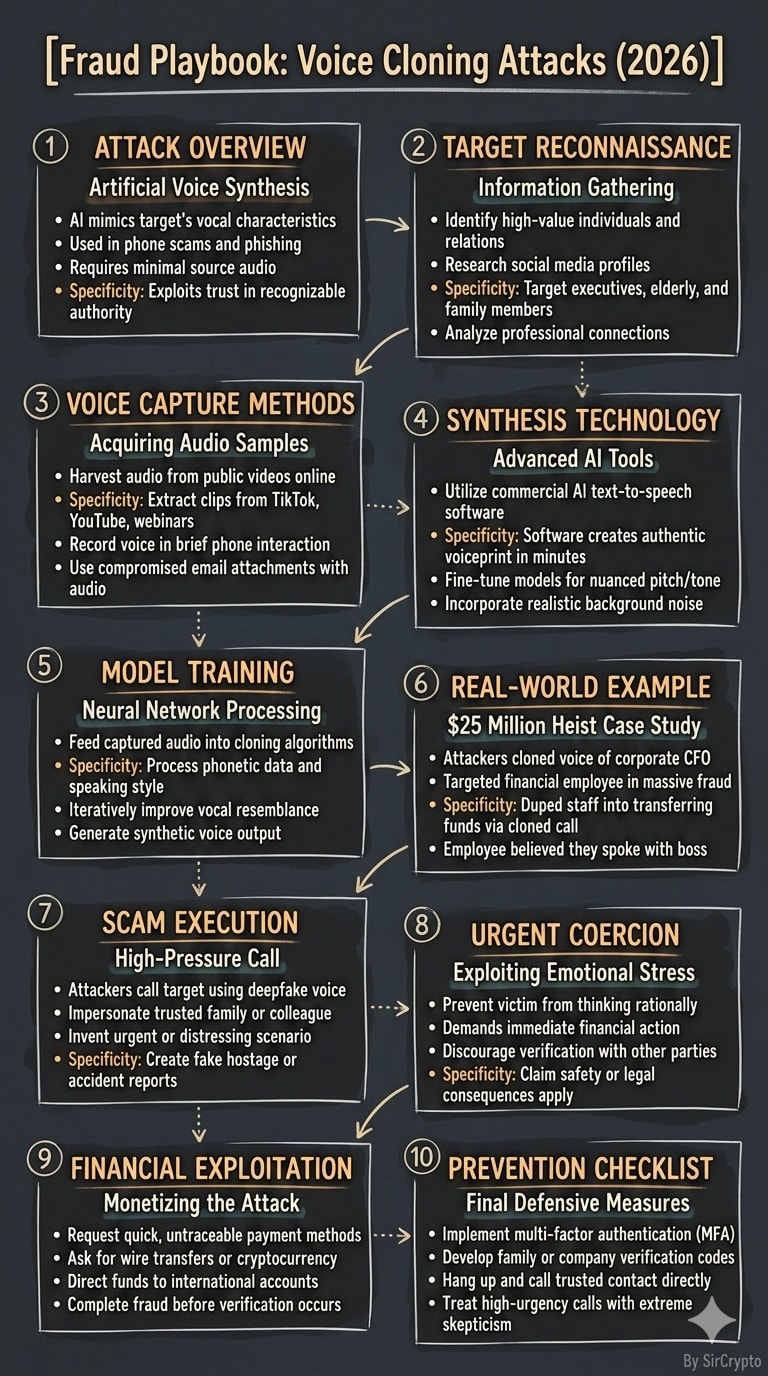
1SYSTEM:2You are an LLM prompt executor.34USER TASK:5Create a vertical 9:16 infographic for TikTok.67TITLE (ONLY ONE TITLE — display this at the top):8[Fraud Playbook: Voice Cloning Attacks (2026)]910LAYOUT (choose ONE):11[1-10 box]12Pick exactly one. Number boxes with circled numbers. Flow top-to-bottom.1314CONTENT RULES:15Each box must include:16- 1 short subheading17- 2–4 bullet points (plain English, phone-readable)1819Must include:20- At least 1 real-world example21- A final checklist/action box whenever possible2223QUALITY GATES:24- Tone: professional, neutral, report-like.25- Specificity: include at least 1 concrete detail per box.26- No filler: avoid vague warnings.27- Evidence discipline: label uncertain claims as “unclear/contested.”28- No repetition. Clear and fast to read.2930TEXT QUALITY REQUIREMENTS:31- Bullets max 10–12 words.32- Prefer 1-6 box for best readability.3334FOOTER CREDIT (small/subtle at the bottom):35By SirCrypto3637OUTPUT REQUIREMENT:38Return:39TITLE: [Fraud Playbook: Voice Cloning Attacks (2026)]40BOX 1: ...41...42FOOTER (small): By SirCrypto4344Then follow the STYLE SPEC below exactly (DO NOT CHANGE it):4546--- STYLE SPEC (DO NOT CHANGE) ---47{48 "layout_options": {49 "box_variants": ["1-2 box", "1-4 box", "1-6 box", "1-8 box", "1-10 box"],50 "remark": "Choose ONE box variant. Keep flow top-to-bottom. Number each box with circled numbers."51 },52 "footer_credit": {53 "text": "By SirCrypto",54 "placement": "Bottom center or bottom right",55 "size": "Small/subtle"56 },57 "style": {58 "name": "War Room Strategy Infographic",59 "description": "Mature command-briefing infographic: tactical labels, decisive callouts, clear hierarchy. Serious, professional."60 },61 "visual_foundation": {62 "surface": {63 "base": "Matte dark slate to charcoal background",64 "texture": "Subtle paper grain + faint chalk/marker smudge texture",65 "edges": "Content extends fully to edges, no border or frame",66 "feel": "Command briefing page on dark paper"67 },68 "overall_impression": "Command-center clarity—direct, credible, high-signal"69 },70 "illustration_style": {71 "line_quality": {72 "type": "Hand-drawn ink/chalk hybrid sketch aesthetic",73 "weight": "Medium strokes for main elements, thinner for details",74 "character": "Confident but imperfect—slight wobble that proves human touch",75 "edges": "Soft, not vector-crisp",76 "fills": "Loose hatching, gentle cross-hatching for shadows, never solid machine fills"77 },78 "icon_treatment": {79 "style": "Minimal tactical icons",80 "complexity": "Essential forms—readable at small sizes",81 "personality": "Professional and decisive, never cute",82 "consistency": "Same hand appears to have drawn everything"83 }84 },85 "color_philosophy": {86 "palette_character": {87 "mood": "Serious, tactical, focused",88 "saturation": "Low-to-medium",89 "harmony": "Muted complementary accents"90 },91 "primary_palette": {92 "ambers": "Muted amber for warnings and priority tags",93 "teals": "Soft teal for steps and logic",94 "off_whites": "Warm off-white ink for main text"95 },96 "color_application": {97 "fills": "Translucent washes behind boxes",98 "accents": "Marker highlight behind keywords (restrained)"99 }100 },101 "typography_integration": {102 "headline_style": {103 "appearance": "Bold hand-lettered feel, slightly uneven baseline",104 "weight": "Heavy, confident",105 "case": "Often uppercase",106 "color": "Warm off-white or muted amber"107 },108 "body_text": {109 "appearance": "Clean readable warm sans-serif",110 "spacing": "Generous"111 }112 },113 "layout_architecture": {114 "canvas": {115 "framing": "NO BORDER, NO FRAME",116 "boundary": "Full-bleed 9:16"117 },118 "structure": {119 "type": "Modular briefing grid",120 "sections": "Numbered boxes per chosen variant",121 "flow": "Top-to-bottom"122 },123 "visual_flow_devices": {124 "arrows": "Hand-drawn curved arrows",125 "connectors": "Dotted lines and braces"126 }127 },128 "technical_quality": {129 "resolution": "High-resolution for phone",130 "clarity": "All text readable",131 "balance": "Not crowded"132 },133 "avoid": [134 "ANY frame, border, or edge decoration",135 "Cute/cartoon characters",136 "Neon overload",137 "Text-dense paragraphs",138 "Sterile vector perfection"139 ]140}141142make picture based on these
Create a steel/industrial blueprint-style infographic designed for social media (“SosMed”). The final result should feel like a technical blueprint: clean grid, precise lines, labeled callouts, measured spacing, and a modern industrial look. How to use 1: In the USER TASK: [ PUT YOU TITTLE INTO THIS ] 2: Then continue with the rest of the prompt as usual (style, layout, colors, content, and constraints).
Hand-illustrated educational infographics.
High-end Prompt Engineering & Prompt Refiner skill. Transforms raw or messy user requests into concise, token-efficient, high-performance master prompts for systems like GPT, Claude, and Gemini. Use when you want to optimize or redesign a prompt so it solves the problem reliably while minimizing tokens.
Create a feature testing page design for Enterprise WeChat/DingTalk focusing on address book management, calendar/schedule management, and message sending/receiving. The design should be user-friendly, sleek, and have a technological appeal.
Collects family recipes from handwritten cards, voice notes and grandparents' memories, turns them into clear recipes with real amounts, and keeps the stories behind each dish in one family cookbook.